> ## Documentation Index
> Fetch the complete documentation index at: https://docs.pipeshub.com/llms.txt
> Use this file to discover all available pages before exploring further.
# Ollama
> Configure PipesHub to use Ollama self-hosted embedding models
# Ollama Embeddings Configuration
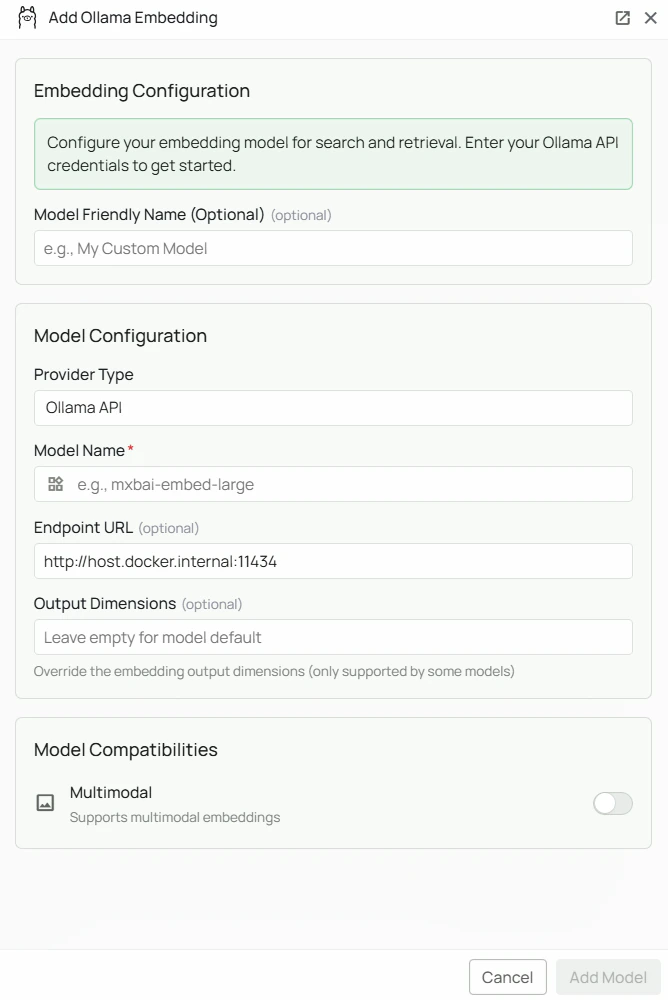 *The Ollama embeddings configuration screen in PipesHub where you'll enter your Model Name and optional Endpoint URL*
PipesHub allows you to integrate with a self-hosted Ollama instance to run embedding models locally. This gives you full control over your data — no external API calls, no usage costs, and no API key required for standard local deployments.
## Required Fields
### Model Name \*
The Model Name field defines which Ollama embedding model you want to use with PipesHub.
**Popular Ollama embedding models include:**
* `mxbai-embed-large` - A high-performance embedding model well-suited for retrieval tasks
**How to choose a model:**
* For general-purpose retrieval, select `mxbai-embed-large`
* Check Ollama's [model library](https://ollama.com/library) for the full list of available embedding models
* Pull the model first with `ollama pull ` before configuring it in PipesHub
## Optional Fields
### Endpoint URL
The URL where your Ollama instance is running. Defaults to `http://host.docker.internal:11434` if left blank.
**Common configurations:**
* `http://host.docker.internal:11434` — for accessing Ollama from within a Docker container (default)
* `https://your-server-domain` — for remote Ollama instances
**Note:** Ensure your Ollama instance is running and reachable from the PipesHub Docker network before configuring.
### API Key
Optional. Leave blank for standard local Ollama instances, which do not require authentication.
**When to use:**
* If you have configured authentication on your Ollama instance
* When connecting to a secured remote Ollama server
## Configuration Steps
As shown in the image above:
1. Click **Configure** on the Ollama provider card
2. Enter your Model Name (marked with \*) — e.g. `mxbai-embed-large`
3. (Optional) Specify your Endpoint URL — defaults to `http://host.docker.internal:11434`
4. (Optional) Enter an API Key if your Ollama instance requires authentication
5. Click **Add Model** to save and validate your credentials
> Model Name is the only required field. No API key is needed for a standard local Ollama installation. The endpoint defaults to `http://host.docker.internal:11434` if left blank.
## Prerequisites
Before configuring Ollama in PipesHub, ensure you have:
1. **Ollama installed** on your machine or server — download from [ollama.com](https://ollama.com/)
2. **The embedding model pulled:**
```bash theme={null}
ollama pull mxbai-embed-large
```
3. **Ollama running:** `ollama serve`
4. **Network accessible:** PipesHub must be able to reach your Ollama endpoint
## Usage Considerations
* All embedding happens locally — data never leaves your infrastructure
* No API key or usage costs required
* Processing speed depends on your server's available CPU/memory/GPU
## Troubleshooting
* Verify Ollama is running: `ollama list`
* Check the endpoint URL matches where Ollama is accessible
* Ensure port 11434 is not blocked by a firewall
* For Docker deployments, verify that `host.docker.internal` resolves correctly
* If the model is not found, pull it first: `ollama pull `
For additional support, refer to the [Ollama documentation](https://github.com/ollama/ollama/tree/main/docs) or contact PipesHub support.
*The Ollama embeddings configuration screen in PipesHub where you'll enter your Model Name and optional Endpoint URL*
PipesHub allows you to integrate with a self-hosted Ollama instance to run embedding models locally. This gives you full control over your data — no external API calls, no usage costs, and no API key required for standard local deployments.
## Required Fields
### Model Name \*
The Model Name field defines which Ollama embedding model you want to use with PipesHub.
**Popular Ollama embedding models include:**
* `mxbai-embed-large` - A high-performance embedding model well-suited for retrieval tasks
**How to choose a model:**
* For general-purpose retrieval, select `mxbai-embed-large`
* Check Ollama's [model library](https://ollama.com/library) for the full list of available embedding models
* Pull the model first with `ollama pull ` before configuring it in PipesHub
## Optional Fields
### Endpoint URL
The URL where your Ollama instance is running. Defaults to `http://host.docker.internal:11434` if left blank.
**Common configurations:**
* `http://host.docker.internal:11434` — for accessing Ollama from within a Docker container (default)
* `https://your-server-domain` — for remote Ollama instances
**Note:** Ensure your Ollama instance is running and reachable from the PipesHub Docker network before configuring.
### API Key
Optional. Leave blank for standard local Ollama instances, which do not require authentication.
**When to use:**
* If you have configured authentication on your Ollama instance
* When connecting to a secured remote Ollama server
## Configuration Steps
As shown in the image above:
1. Click **Configure** on the Ollama provider card
2. Enter your Model Name (marked with \*) — e.g. `mxbai-embed-large`
3. (Optional) Specify your Endpoint URL — defaults to `http://host.docker.internal:11434`
4. (Optional) Enter an API Key if your Ollama instance requires authentication
5. Click **Add Model** to save and validate your credentials
> Model Name is the only required field. No API key is needed for a standard local Ollama installation. The endpoint defaults to `http://host.docker.internal:11434` if left blank.
## Prerequisites
Before configuring Ollama in PipesHub, ensure you have:
1. **Ollama installed** on your machine or server — download from [ollama.com](https://ollama.com/)
2. **The embedding model pulled:**
```bash theme={null}
ollama pull mxbai-embed-large
```
3. **Ollama running:** `ollama serve`
4. **Network accessible:** PipesHub must be able to reach your Ollama endpoint
## Usage Considerations
* All embedding happens locally — data never leaves your infrastructure
* No API key or usage costs required
* Processing speed depends on your server's available CPU/memory/GPU
## Troubleshooting
* Verify Ollama is running: `ollama list`
* Check the endpoint URL matches where Ollama is accessible
* Ensure port 11434 is not blocked by a firewall
* For Docker deployments, verify that `host.docker.internal` resolves correctly
* If the model is not found, pull it first: `ollama pull `
For additional support, refer to the [Ollama documentation](https://github.com/ollama/ollama/tree/main/docs) or contact PipesHub support.