> ## Documentation Index
> Fetch the complete documentation index at: https://docs.pipeshub.com/llms.txt
> Use this file to discover all available pages before exploring further.
# Ollama
> Configure PipesHub Workplace AI to use different Ollama models
# Ollama Configuration
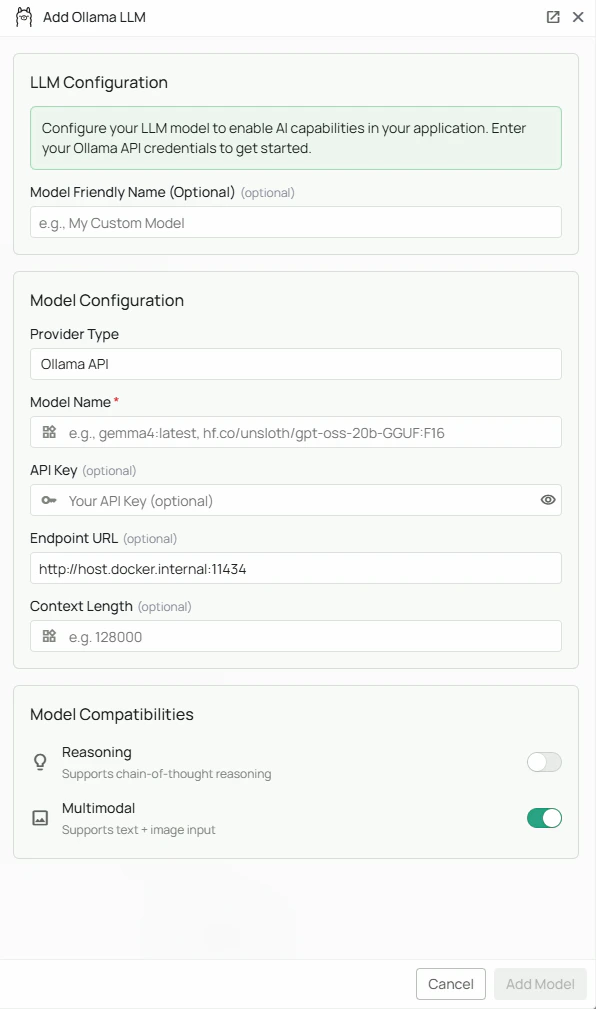 *The Ollama configuration screen in PipesHub where you'll configure your local Ollama instance connection*
PipesHub allows you to integrate with Ollama to run open-source language models locally, providing privacy-focused AI capabilities in your workspace with full control over your data and infrastructure.
## Required Fields
### Model Name \*
The Model Name field defines which Ollama model you want to use with PipesHub.
**Popular Ollama models include:**
* `gemma4:latest` - Google's Gemma 4 model
* `hf.co/unsloth/gpt-oss-20b-GGUF:F16` - A Hugging Face-hosted GGUF model
**How to choose a model:**
* For multimodal capabilities (text + images), select models with vision support
* Check Ollama's [model library](https://ollama.com/library) for the complete list of available models
## Optional Fields
### Endpoint URL
The Endpoint URL specifies where your Ollama instance is running. Defaults to `http://host.docker.internal:11434` if left blank.
**Common configurations:**
* `http://host.docker.internal:11434` - For accessing Ollama from within a Docker container (default)
* `https://your-server-domain` - For remote Ollama instances
**Default port:** Ollama runs on port `11434` by default.
**Note:** Ensure your Ollama instance is running and accessible at the specified endpoint before configuring PipesHub.
### API Key
The API Key field is optional for Ollama configurations. Most local Ollama instances do not require authentication.
**When to use:**
* If you've configured authentication on your Ollama instance
* When connecting to a secured remote Ollama server
* For enterprise deployments with access control
If your Ollama instance doesn't require authentication, you can leave this field empty.
## Advanced Options
### Multimodal Support
Enable the Multimodal checkbox if your selected model supports both text and image inputs.
**Multimodal-capable models include:**
* `qwen3-vl:8b`
**When enabled:**
* PipesHub can send both text and image data to the model
* Supports use cases like image analysis, visual question answering, and document understanding
### Reasoning
Enable the Reasoning checkbox if your selected model has enhanced reasoning capabilities.
**When enabled:**
* The model will be used for tasks requiring complex logical reasoning
* Better performance on multi-step problem solving
* Enhanced analytical capabilities
## Configuration Steps
As shown in the image above:
1. Click **Configure** on the Ollama provider card
2. Enter your Model Name (marked with \*) — e.g., `gemma4:latest` or `hf.co/unsloth/gpt-oss-20b-GGUF:F16`
3. (Optional) Specify your Endpoint URL — defaults to `http://host.docker.internal:11434`
4. (Optional) Enter an API Key if your Ollama instance requires authentication
5. (Optional) Check "Multimodal" if your model supports text + image processing
6. (Optional) Check "Reasoning" if your model has enhanced reasoning capabilities
7. Click **Add Model** to save and validate your credentials
> Model Name is the only required field. The endpoint defaults to `http://host.docker.internal:11434` if left blank. No API key is required for a standard local Ollama installation.
## Prerequisites
Before configuring Ollama in PipesHub, ensure you have:
1. **Ollama installed** on your machine or server
* Download from [ollama.com](https://ollama.com/)
* Follow installation instructions for your operating system
2. **Model downloaded** - Pull your desired model:
```bash theme={null}
ollama pull qwen3-vl:8b
# or any other model from the library
```
3. **Ollama running** - Start the Ollama service:
```bash theme={null}
ollama serve
```
4. **Network accessibility** - Ensure PipesHub can reach your Ollama endpoint
## Usage Considerations
### Advantages of Ollama
* **Privacy:** All processing happens locally or on your infrastructure
* **Cost-effective:** No API usage fees or quotas
* **Customizable:** Full control over model selection and configuration
* **Offline capable:** Works without internet connectivity (after initial model download)
* **No rate limits:** Process as many requests as your hardware can handle
### System Requirements
* Sufficient RAM (varies by model - typically 8GB minimum, 16GB+ recommended)
* Modern CPU or GPU for optimal performance
* Adequate disk space for model storage (models range from 2GB to 40GB+)
### Performance Tips
* Use GPU acceleration when available for faster inference
* Choose smaller models for quicker responses if your use case allows
* Consider quantized models (e.g., `llama2:7b-q4` vs `llama2:7b`) for lower memory usage
## Troubleshooting
### Connection Issues
* **Verify Ollama is running:** Run `ollama list` in your terminal
* **Check endpoint URL:** Ensure the URL matches where Ollama is accessible
* **Firewall settings:** Verify that port 11434 is not blocked
* **Docker networking:** If using Docker, ensure proper network configuration for `host.docker.internal`
### Model Issues
* **Model not found:** Ensure you've pulled the model with `ollama pull `
* **Out of memory:** Try a smaller or quantized version of the model
* **Slow performance:** Consider using a GPU
### Multimodal Issues
* **Images not processing:** Verify your selected model supports vision capabilities
* **Check model documentation:** Not all models support multimodal inputs
## Available Models
Visit the [Ollama Model Library](https://ollama.com/library) to browse all available models, including:
* Language models (LLMs)
* Code-specialized models
* Multimodal models (vision + language)
* Embedding models
* Quantized variants for efficiency
For additional support, refer to the [Ollama documentation](https://github.com/ollama/ollama/tree/main/docs) or contact PipesHub support.
*The Ollama configuration screen in PipesHub where you'll configure your local Ollama instance connection*
PipesHub allows you to integrate with Ollama to run open-source language models locally, providing privacy-focused AI capabilities in your workspace with full control over your data and infrastructure.
## Required Fields
### Model Name \*
The Model Name field defines which Ollama model you want to use with PipesHub.
**Popular Ollama models include:**
* `gemma4:latest` - Google's Gemma 4 model
* `hf.co/unsloth/gpt-oss-20b-GGUF:F16` - A Hugging Face-hosted GGUF model
**How to choose a model:**
* For multimodal capabilities (text + images), select models with vision support
* Check Ollama's [model library](https://ollama.com/library) for the complete list of available models
## Optional Fields
### Endpoint URL
The Endpoint URL specifies where your Ollama instance is running. Defaults to `http://host.docker.internal:11434` if left blank.
**Common configurations:**
* `http://host.docker.internal:11434` - For accessing Ollama from within a Docker container (default)
* `https://your-server-domain` - For remote Ollama instances
**Default port:** Ollama runs on port `11434` by default.
**Note:** Ensure your Ollama instance is running and accessible at the specified endpoint before configuring PipesHub.
### API Key
The API Key field is optional for Ollama configurations. Most local Ollama instances do not require authentication.
**When to use:**
* If you've configured authentication on your Ollama instance
* When connecting to a secured remote Ollama server
* For enterprise deployments with access control
If your Ollama instance doesn't require authentication, you can leave this field empty.
## Advanced Options
### Multimodal Support
Enable the Multimodal checkbox if your selected model supports both text and image inputs.
**Multimodal-capable models include:**
* `qwen3-vl:8b`
**When enabled:**
* PipesHub can send both text and image data to the model
* Supports use cases like image analysis, visual question answering, and document understanding
### Reasoning
Enable the Reasoning checkbox if your selected model has enhanced reasoning capabilities.
**When enabled:**
* The model will be used for tasks requiring complex logical reasoning
* Better performance on multi-step problem solving
* Enhanced analytical capabilities
## Configuration Steps
As shown in the image above:
1. Click **Configure** on the Ollama provider card
2. Enter your Model Name (marked with \*) — e.g., `gemma4:latest` or `hf.co/unsloth/gpt-oss-20b-GGUF:F16`
3. (Optional) Specify your Endpoint URL — defaults to `http://host.docker.internal:11434`
4. (Optional) Enter an API Key if your Ollama instance requires authentication
5. (Optional) Check "Multimodal" if your model supports text + image processing
6. (Optional) Check "Reasoning" if your model has enhanced reasoning capabilities
7. Click **Add Model** to save and validate your credentials
> Model Name is the only required field. The endpoint defaults to `http://host.docker.internal:11434` if left blank. No API key is required for a standard local Ollama installation.
## Prerequisites
Before configuring Ollama in PipesHub, ensure you have:
1. **Ollama installed** on your machine or server
* Download from [ollama.com](https://ollama.com/)
* Follow installation instructions for your operating system
2. **Model downloaded** - Pull your desired model:
```bash theme={null}
ollama pull qwen3-vl:8b
# or any other model from the library
```
3. **Ollama running** - Start the Ollama service:
```bash theme={null}
ollama serve
```
4. **Network accessibility** - Ensure PipesHub can reach your Ollama endpoint
## Usage Considerations
### Advantages of Ollama
* **Privacy:** All processing happens locally or on your infrastructure
* **Cost-effective:** No API usage fees or quotas
* **Customizable:** Full control over model selection and configuration
* **Offline capable:** Works without internet connectivity (after initial model download)
* **No rate limits:** Process as many requests as your hardware can handle
### System Requirements
* Sufficient RAM (varies by model - typically 8GB minimum, 16GB+ recommended)
* Modern CPU or GPU for optimal performance
* Adequate disk space for model storage (models range from 2GB to 40GB+)
### Performance Tips
* Use GPU acceleration when available for faster inference
* Choose smaller models for quicker responses if your use case allows
* Consider quantized models (e.g., `llama2:7b-q4` vs `llama2:7b`) for lower memory usage
## Troubleshooting
### Connection Issues
* **Verify Ollama is running:** Run `ollama list` in your terminal
* **Check endpoint URL:** Ensure the URL matches where Ollama is accessible
* **Firewall settings:** Verify that port 11434 is not blocked
* **Docker networking:** If using Docker, ensure proper network configuration for `host.docker.internal`
### Model Issues
* **Model not found:** Ensure you've pulled the model with `ollama pull `
* **Out of memory:** Try a smaller or quantized version of the model
* **Slow performance:** Consider using a GPU
### Multimodal Issues
* **Images not processing:** Verify your selected model supports vision capabilities
* **Check model documentation:** Not all models support multimodal inputs
## Available Models
Visit the [Ollama Model Library](https://ollama.com/library) to browse all available models, including:
* Language models (LLMs)
* Code-specialized models
* Multimodal models (vision + language)
* Embedding models
* Quantized variants for efficiency
For additional support, refer to the [Ollama documentation](https://github.com/ollama/ollama/tree/main/docs) or contact PipesHub support.