> ## Documentation Index
> Fetch the complete documentation index at: https://docs.pipeshub.com/llms.txt
> Use this file to discover all available pages before exploring further.
# Whisper (Local)
> Configure PipesHub to use a self-hosted Whisper speech-to-text model
# Whisper (Local) Speech to Text Configuration
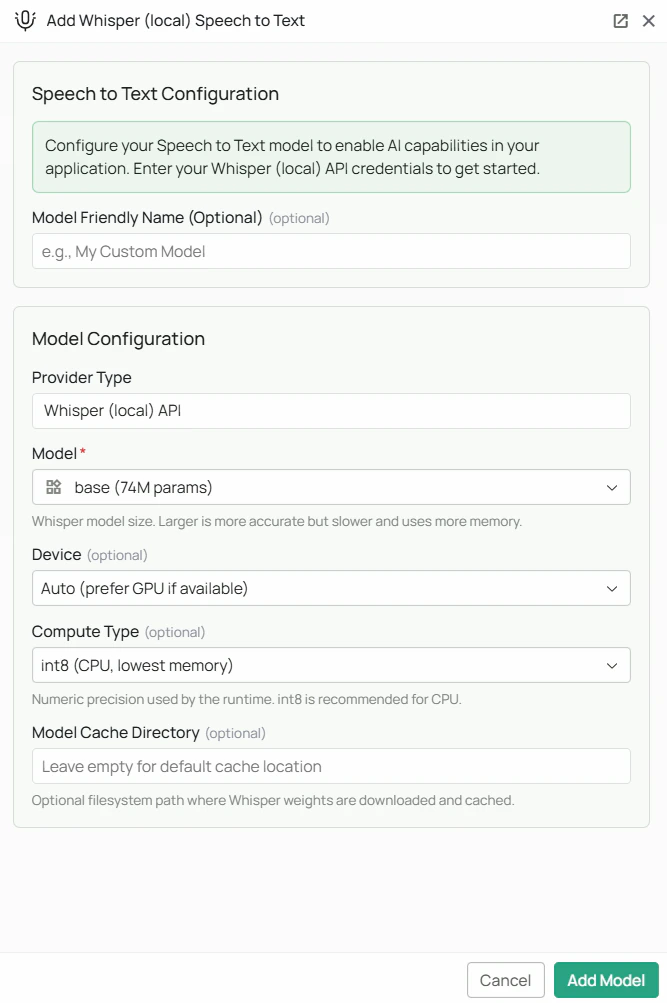 *The Whisper local STT configuration screen in PipesHub where you'll select your model size and compute settings*
PipesHub supports running Whisper entirely on your own infrastructure using the faster-whisper library. No API key is required — all audio processing happens locally, keeping your data private and eliminating per-request API costs.
Whisper model weights are downloaded from HuggingFace on first use. Ensure the PipesHub backend host has internet access during initial setup. The `faster-whisper` Python package must also be installed on the backend host.
## Required Fields
### Model \*
Select the Whisper model size from the dropdown. Larger models are more accurate but require more memory and processing time.
| Model | Parameters | Notes |
| ----------------- | ---------- | -------------------------------------------------------------------------------------------- |
| `tiny` | 39M | Fastest, lowest accuracy. Good for simple, clear audio. |
| `base` | 74M | Default. Good balance of speed and accuracy for most use cases. |
| `small` | 244M | Better accuracy than base, moderate speed. |
| `medium` | 769M | High accuracy, slower. Suitable for professional transcription. |
| `large-v2` | 1.55B | Very high accuracy. Requires significant RAM/VRAM. |
| `large-v3` | 1.55B | Newest large model, highest accuracy. Requires \~3 GB disk space and significant RAM/VRAM. |
| `distil-large-v3` | 756M | Approximately 6x faster than large-v3 with similar accuracy. Recommended for production use. |
**How to choose a model size:**
* For real-time voice input where speed matters most, start with `base` or `small`
* For high-accuracy transcription of important audio, use `distil-large-v3` or `large-v3`
* If you have a GPU available, larger models become much more practical
## Optional Fields
### Device
Controls which hardware the model runs on.
* **Auto** (default) — PipesHub automatically uses a GPU if one is available, otherwise falls back to CPU
* **CPU** — forces CPU inference (slower but works on any machine)
* **CUDA** — forces NVIDIA GPU inference (requires a compatible NVIDIA GPU with CUDA support)
### Compute Type
Controls the numerical precision used during inference. Lower precision uses less memory and runs faster; higher precision is more accurate.
| Compute Type | Best for | Notes |
| -------------- | -------------- | -------------------------------------------------------------- |
| `int8` | CPU (default) | Lowest memory usage. Recommended when running on CPU. |
| `int8_float16` | GPU | Good balance of speed and memory on GPU. |
| `float16` | GPU | Faster on GPU with moderate memory usage. |
| `float32` | High precision | Highest numerical accuracy. Slowest and most memory-intensive. |
### Model Cache Directory
A filesystem path on the backend host where downloaded model weights will be stored. Leave blank to use the faster-whisper default cache location.
**Example:** `/data/whisper-models`
This is useful if you want to pre-download models to a specific disk, or if the default cache location has limited storage.
## Configuration Steps
As shown in the image above:
1. Click **Configure** on the Whisper (Local) provider card in the STT tab
2. Select your desired **Model** size from the dropdown (marked with \*)
3. (Optional) Set **Device** — leave on Auto unless you need to force CPU or GPU
4. (Optional) Set **Compute Type** — leave on `int8` for CPU or `int8_float16` for GPU
5. (Optional) Set a **Model Cache Directory** to control where weights are stored
6. (Optional) Set a **Model Friendly Name**
7. Click **Add Model** to save your configuration
> On first use after saving, PipesHub will download the selected model weights from HuggingFace. This may take several minutes depending on model size and network speed.
## Usage Considerations
* No API costs — all transcription runs locally on your infrastructure
* The `large-v3` model requires approximately 3 GB of disk space and at least 4 GB of VRAM (or 8 GB of RAM for CPU inference)
* `distil-large-v3` offers the best accuracy-to-speed ratio and is recommended for most production deployments
* First use requires an internet connection to download the model weights; subsequent uses work offline
* Whisper supports transcription in 50+ languages automatically
## Troubleshooting
* If the health check fails, confirm the `faster-whisper` Python package is installed on the backend host
* If model weights fail to download, check that the backend host has internet access and can reach HuggingFace (huggingface.co)
* If transcription is very slow, consider switching to a smaller model or enabling GPU inference with CUDA
* If you get out-of-memory errors, switch to a smaller model or use `int8` compute type
* Ensure the Model Cache Directory (if set) exists and is writable by the PipesHub process
For additional support, refer to the [faster-whisper documentation](https://github.com/SYSTRAN/faster-whisper) or contact PipesHub support.
*The Whisper local STT configuration screen in PipesHub where you'll select your model size and compute settings*
PipesHub supports running Whisper entirely on your own infrastructure using the faster-whisper library. No API key is required — all audio processing happens locally, keeping your data private and eliminating per-request API costs.
Whisper model weights are downloaded from HuggingFace on first use. Ensure the PipesHub backend host has internet access during initial setup. The `faster-whisper` Python package must also be installed on the backend host.
## Required Fields
### Model \*
Select the Whisper model size from the dropdown. Larger models are more accurate but require more memory and processing time.
| Model | Parameters | Notes |
| ----------------- | ---------- | -------------------------------------------------------------------------------------------- |
| `tiny` | 39M | Fastest, lowest accuracy. Good for simple, clear audio. |
| `base` | 74M | Default. Good balance of speed and accuracy for most use cases. |
| `small` | 244M | Better accuracy than base, moderate speed. |
| `medium` | 769M | High accuracy, slower. Suitable for professional transcription. |
| `large-v2` | 1.55B | Very high accuracy. Requires significant RAM/VRAM. |
| `large-v3` | 1.55B | Newest large model, highest accuracy. Requires \~3 GB disk space and significant RAM/VRAM. |
| `distil-large-v3` | 756M | Approximately 6x faster than large-v3 with similar accuracy. Recommended for production use. |
**How to choose a model size:**
* For real-time voice input where speed matters most, start with `base` or `small`
* For high-accuracy transcription of important audio, use `distil-large-v3` or `large-v3`
* If you have a GPU available, larger models become much more practical
## Optional Fields
### Device
Controls which hardware the model runs on.
* **Auto** (default) — PipesHub automatically uses a GPU if one is available, otherwise falls back to CPU
* **CPU** — forces CPU inference (slower but works on any machine)
* **CUDA** — forces NVIDIA GPU inference (requires a compatible NVIDIA GPU with CUDA support)
### Compute Type
Controls the numerical precision used during inference. Lower precision uses less memory and runs faster; higher precision is more accurate.
| Compute Type | Best for | Notes |
| -------------- | -------------- | -------------------------------------------------------------- |
| `int8` | CPU (default) | Lowest memory usage. Recommended when running on CPU. |
| `int8_float16` | GPU | Good balance of speed and memory on GPU. |
| `float16` | GPU | Faster on GPU with moderate memory usage. |
| `float32` | High precision | Highest numerical accuracy. Slowest and most memory-intensive. |
### Model Cache Directory
A filesystem path on the backend host where downloaded model weights will be stored. Leave blank to use the faster-whisper default cache location.
**Example:** `/data/whisper-models`
This is useful if you want to pre-download models to a specific disk, or if the default cache location has limited storage.
## Configuration Steps
As shown in the image above:
1. Click **Configure** on the Whisper (Local) provider card in the STT tab
2. Select your desired **Model** size from the dropdown (marked with \*)
3. (Optional) Set **Device** — leave on Auto unless you need to force CPU or GPU
4. (Optional) Set **Compute Type** — leave on `int8` for CPU or `int8_float16` for GPU
5. (Optional) Set a **Model Cache Directory** to control where weights are stored
6. (Optional) Set a **Model Friendly Name**
7. Click **Add Model** to save your configuration
> On first use after saving, PipesHub will download the selected model weights from HuggingFace. This may take several minutes depending on model size and network speed.
## Usage Considerations
* No API costs — all transcription runs locally on your infrastructure
* The `large-v3` model requires approximately 3 GB of disk space and at least 4 GB of VRAM (or 8 GB of RAM for CPU inference)
* `distil-large-v3` offers the best accuracy-to-speed ratio and is recommended for most production deployments
* First use requires an internet connection to download the model weights; subsequent uses work offline
* Whisper supports transcription in 50+ languages automatically
## Troubleshooting
* If the health check fails, confirm the `faster-whisper` Python package is installed on the backend host
* If model weights fail to download, check that the backend host has internet access and can reach HuggingFace (huggingface.co)
* If transcription is very slow, consider switching to a smaller model or enabling GPU inference with CUDA
* If you get out-of-memory errors, switch to a smaller model or use `int8` compute type
* Ensure the Model Cache Directory (if set) exists and is writable by the PipesHub process
For additional support, refer to the [faster-whisper documentation](https://github.com/SYSTRAN/faster-whisper) or contact PipesHub support.