
Sentence Transformers Embeddings Configuration
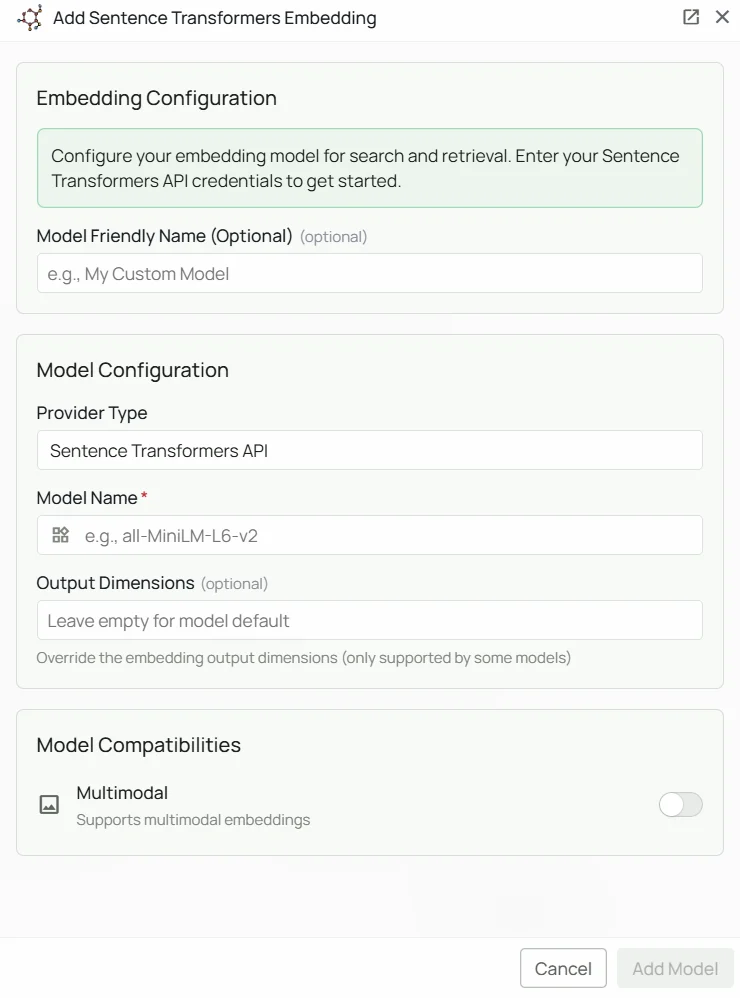
Required Fields
Model Name *
The Model Name is the only required field. It defines which Sentence Transformer model you want to use. Popular Sentence Transformer models include:all-MiniLM-L6-v2- Lightweight general-purpose model, good balance of speed and qualityall-mpnet-base-v2- Higher accuracy general-purpose modelparaphrase-multilingual-mpnet-base-v2- Supports 50+ languages for multilingual applications
- For general purpose use, select
all-MiniLM-L6-v2 - For higher accuracy when speed is less critical, select
all-mpnet-base-v2 - For multilingual content, select
paraphrase-multilingual-mpnet-base-v2 - Check the Sentence Transformers documentation for the full list of available models
Configuration Steps
As shown in the image above:- Click Configure on the Sentence Transformers provider card
- Specify your desired Model Name (marked with *)
- Click Add Model to save and validate
Model Name is the only required field. No API key or external service is needed — the model runs locally inside PipesHub.
Usage Considerations
- No external API calls are made — all embedding happens locally inside PipesHub
- No API key or billing setup required
- Larger models provide better quality but require more memory and are slower to load
- Most models support a maximum sequence length of 128–512 tokens per document chunk
Troubleshooting
- If you encounter errors, verify the model name is spelled correctly
- For memory issues, consider switching to a smaller model such as
all-MiniLM-L6-v2 - For multilingual applications, ensure you are using a model that supports your target languages