
- A web app that people use in the browser for search, chat, and administration.
- An API that authenticates users, enforces permissions, and manages knowledge bases and files.
- Python services that sync data from your company apps, turn documents into searchable pieces, and return answers with citations.
Follow a question through the system
1
You ask in the browser, through an API, or through an agent
The browser, a REST or SDK client, or an MCP client sends your question to the Node.js API over HTTP. Chat and search can stream the reply over Server-Sent Events (SSE), which keeps a live connection open so the answer appears as it is written.
2
The API checks who is asking
The Node.js API verifies your session or token, applies your permissions, and forwards the question to the Query service.
3
Query finds sources and writes a cited answer
Query looks up related records in the knowledge graph and similar text in Qdrant, then calls the language model you configured. You get an answer with citations that point back to the original documents.
- Connectors pull data from Slack, Drive, Jira, Confluence, and your other sources.
- They publish new or changed records onto the event bus.
- Indexing parses the files, turns the text into vectors, and writes the knowledge graph and Qdrant.
Architecture diagram
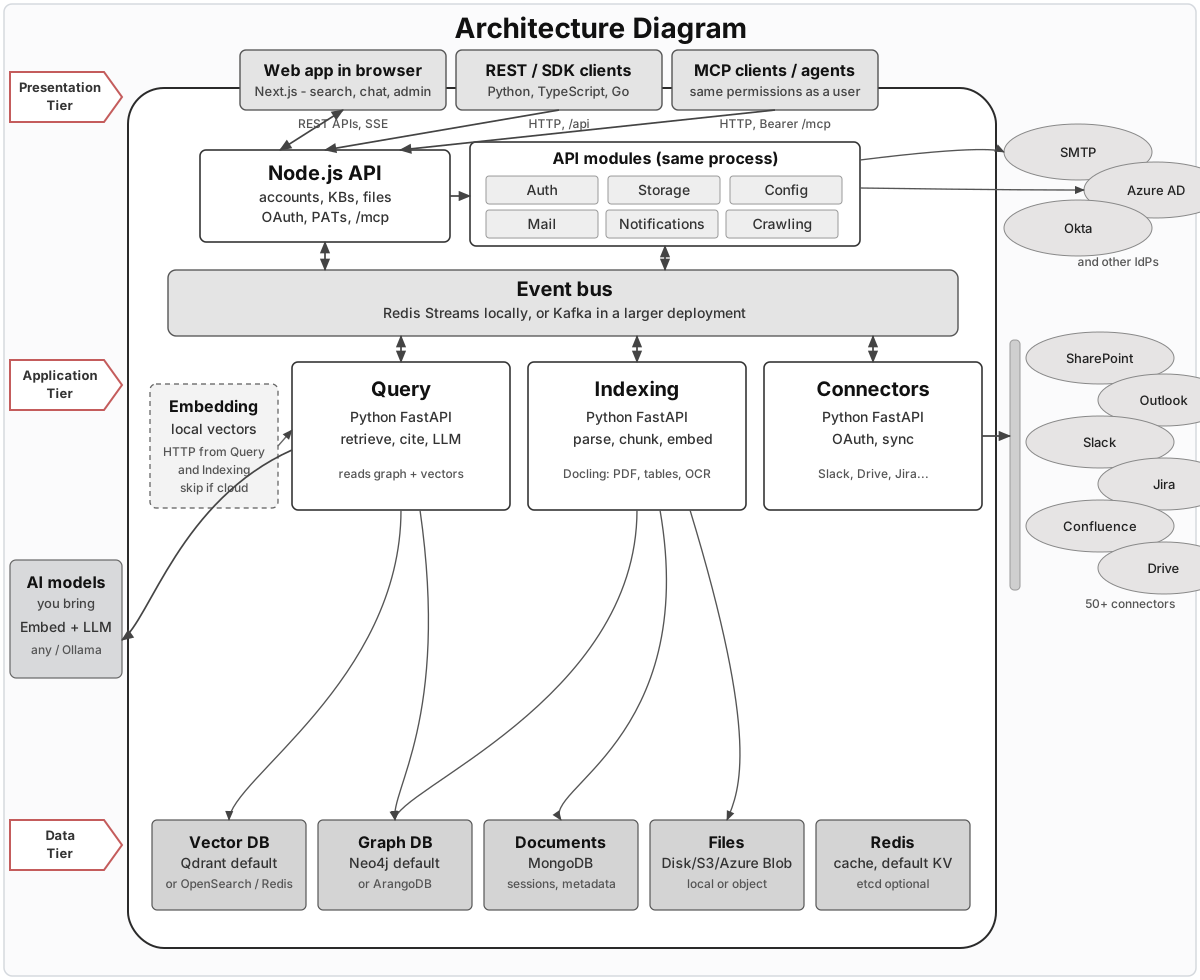
Click the figure to open it full size.
Who talks to PipesHub
Web app
People use PipesHub in the browser. The interface is a Next.js application for search, chat, and administration.REST and SDK clients
Your own applications talk to the HTTP API. Use the REST endpoints directly, or the Python, TypeScript, and Go SDKs. The API reference lists the routes.Agents and MCP
Agents connect at/mcp using Streamable HTTP. Setup is in the MCP overview. An agent signs in with a personal access token and receives the same records you would see when signed in as that user.
Node.js API
The API is a Node.js process built with Express. The web app, REST and SDK clients, and MCP clients all talk to this process. It handles accounts, permissions, knowledge bases, file uploads, user authentication, personal access tokens, and MCP. On a default Docker install, this is the only Node process. It listens on port 3000 and serves the built Next.js files,/api, and /mcp. If you run from source during development, the Next.js dev server is typically on port 3001 and Express is on port 3000. Helm exposes this combined Node service on port 3001.
If you need the HTTP reference for a specific area:
How work is done
Modules in the API process
Auth, Storage, Mail, Config, Notifications, Crawling, and the connector manager run inside this Express process.Event bus
Connectors publish records onto the event bus, and Indexing consumes them. You choose the transport to match the size of the deployment:- On a local machine, the event bus is Redis Streams (
MESSAGE_BROKER=redis). - In a larger deployment, the event bus is Kafka (
MESSAGE_BROKER=kafka).
Query, Indexing, and Connectors
Query, Indexing, and Connectors are Python FastAPI services. Connectors talk to Slack, Drive, Jira, Confluence, and the rest of your company apps. They complete OAuth with those providers, refresh the tokens, and publish new or changed records onto the event bus. The connector manager in the API stores the encrypted configuration and forwards the browser OAuth redirects to this Python service. See the connectors overview for the full list. Indexing consumes those records from the event bus. It parses files, splits them into chunks, embeds the text, and writes Qdrant and the knowledge graph. Docling is the heavier parser for PDFs, tables, and OCR. Two additional processes, Parsing and Extraction, start only if you setUSE_PARSING_SERVICE=true.
Query answers questions. It reads the knowledge graph and the vector store, then calls your language model. On the event bus it listens for configuration updates.
Embedding server
Indexing and Query need vectors: lists of numbers that represent the meaning of a piece of text, so similar passages can be found later. On a default install they call a local embedding server over HTTP. The server speaks the OpenAI-compatible/v1/embeddings API. The box is dashed in the diagram because Query and Indexing call this server directly over HTTP. If you configure a cloud embedding provider, you can skip this process.
Where data lives
Each box along the bottom of the diagram holds a different kind of state. The table below matches a default install. Vendor notes and links are on external services.Models you bring
You point PipesHub at models you already use.- An embedding model turns parsed text into vectors for Qdrant. The local embedding server is the default for this.
- A language model (LLM) writes the cited answer. You can use any provider, or a local model through Ollama.