

















Overview
BookStack is a free and open-source wiki and documentation platform similar to Confluence that is designed for creating, organizing, and storing information in a simple, self-hosted environment.Book-based Structure
It uses a hierarchical structure based on real-world books for organization: Shelves → Books → Chapters → Pages BookStack provides multiple ways through which it can be deployed (e.g., Docker, Ubuntu 24.04 Installation Script, and many other 3rd party hosting options). Official Installation Guide: https://www.bookstackapp.com/docs/admin/installation/⚠️ Note on API Rate Limits BookStack defaults to 180 API requests per minute. To prevent sync failures on large documentation bases, we recommend increasing theAPI_REQUESTS_PER_MINvariable to around 1000-1500 in your BookStack server’s.envfile.
- Standard/Ubuntu: Edit the
.envfile in your installation root (usually/var/www/bookstack/.env).- Docker: Add
API_REQUESTS_PER_MIN: 1000under theenvironment:section of yourdocker-compose.ymlfile and recreate the container.
Configuration Guide
Generate API Token in BookStack
Generate API Token in BookStack
BookStack uses a system of Token IDs and Token Secrets to authenticate external applications and scripts via its built-in REST API.The API operations performed with the token will have the same permissions as the user who generated it.It is recommended to use a user with admin permissions to create the api token because sync requires permission to read all entities (shelves, books, pages, etc.) aswell as read the audit log to which only admin users have access.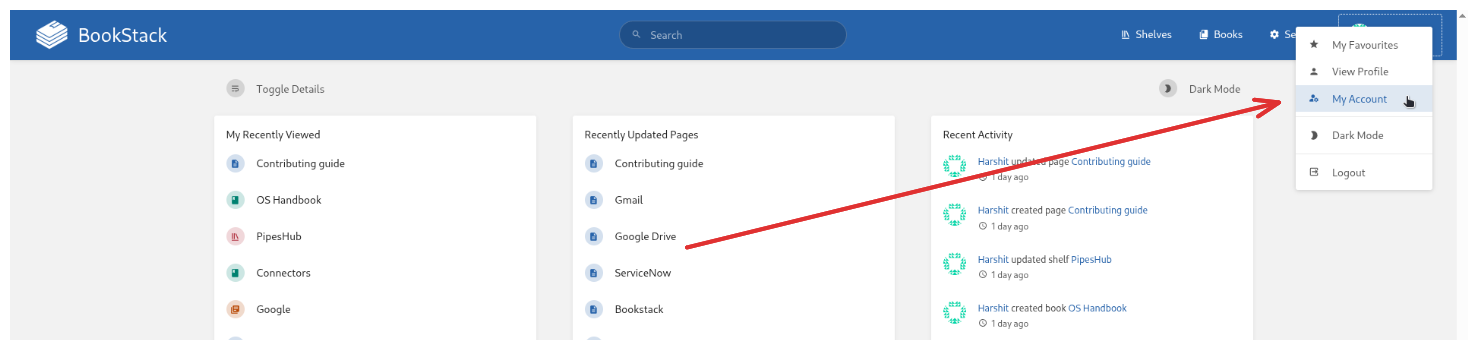
Prerequisites
The user generating the token must have a role assigned that includes the “Access system API” permission. (The default Admin role usually has this permission).Creating a Token
- Navigate to Profile: Click on your user profile icon (in the top right corner) and select “My Account”.
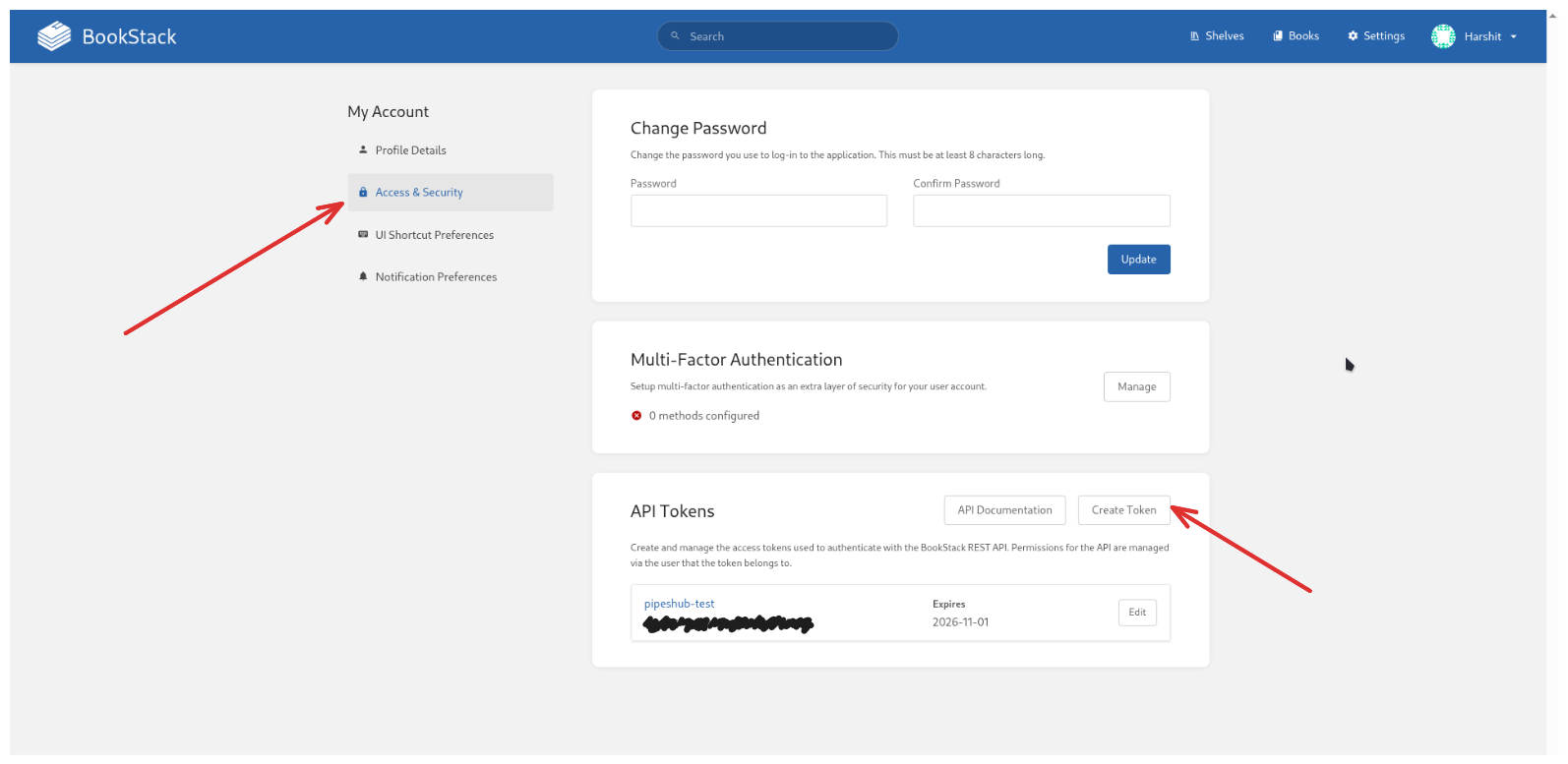
- Find API Tokens Section: On the left-hand side of the “My Account” page, go to the “Access & Security” tab, and you should see the “API Tokens” section at the bottom.
- Create New Token: Click the “Create Token” button.
-
Enter Details:
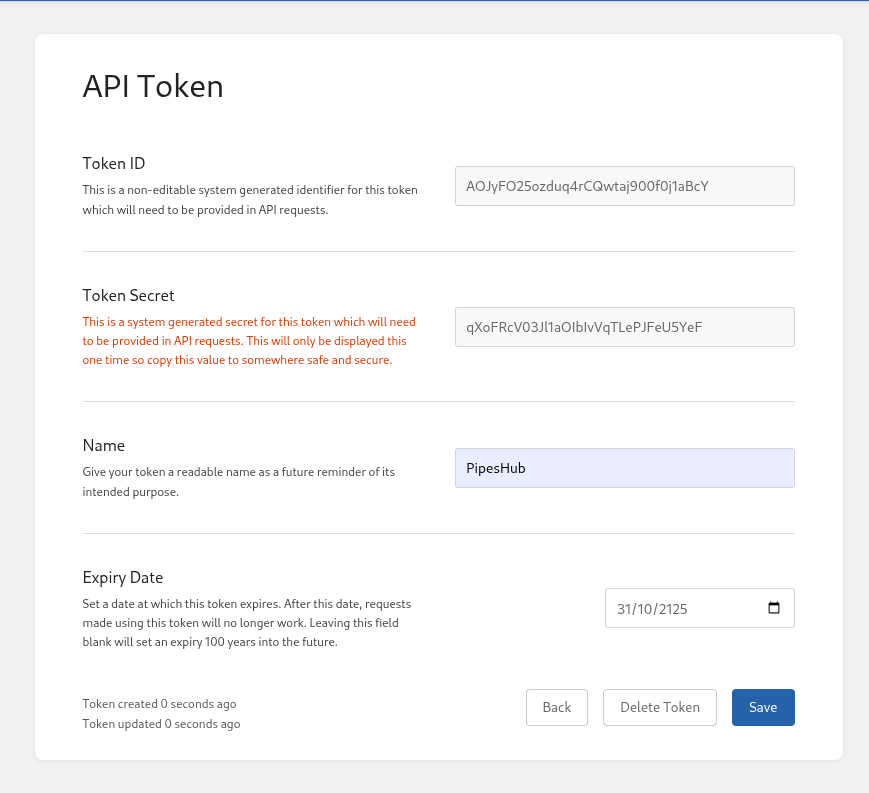
- Name: Enter a descriptive name for the token (e.g., “Pipeshub-Integration”).
- Expiry Date (Optional): Set an expiration date if you want the token to automatically become invalid after a certain time for security purposes.
- Save and Copy: Click “Save”.
Connect BookStack to PipesHub
Connect BookStack to PipesHub
The integration requires three pieces of information:
- BookStack Base URL (the URL in which your BookStack instance is deployed, e.g.,
https://bookstack.mycompany.com) - API Token ID
- API Token Secret
Connection Steps
Step 1: Access and Configure Connector
- Go to Connector Settings in the PipesHub dashboard.
- Select the BookStack Connector.
- Click the Configure Setting button.
Step 2: Input Credentials
- Paste the BookStack Base URL.
- Paste the BookStack Token ID.
- Paste the BookStack Token Secret.
Step 3: Set Sync Strategy
- Set your sync strategy as Manual or Webhooks (to be implemented)
Step 4: Activate Connection
- Click Enable App button.
- The BookStack Connector is now active and will start syncing the shelves, books, chapters, and pages.
FAQ
My sync is stalling or failing on large wikis
My sync is stalling or failing on large wikis
This is usually caused by BookStack’s default API rate limit.Please refer to the Overview section above to see how to increase the
API_REQUESTS_PER_MIN variable in your BookStack deployment’s .env or docker-compose.yml file.Does the API Token expire?
Does the API Token expire?
It depends on how you created it. During token creation, the “Expiry Date” field is optional. If you left it blank, the token will expire in 100 years. If you set a date, you will need to generate a new token and update the connector settings in PipesHub before that date.
What permissions are required?
What permissions are required?
The user account generating the token must have the “Access system API” role permission.We strongly recommend using an Admin account because non-admin users cannot access the “Audit Log,” which the connector uses to track changes and keep your data in sync efficiently.
How often does the connector sync data?
How often does the connector sync data?
The connector can be configured to sync data on a schedule or manually. Webhooks are planned for future implementation to enable real-time synchronization.
Facing issues not mentioned here?
Facing issues not mentioned here?
If you’re experiencing issues not covered in this documentation, please check the docker logs for bookstack to see if it’s failing from there, otherwise feel free to reach out to our support team for assistance on our discord.
Queries not returning results. What could be wrong?
Queries not returning results. What could be wrong?
There are three common causes:
-
Email mismatch - The email used during connector authentication doesn’t match your PipesHub account email. This causes permission issues preventing you from accessing synced data.
- Fix: Reconfigure the connector and authenticate using the same email as your PipesHub account.
-
Records show in “All Records” but not in search - Documents display in the All Records section but don’t appear in search query results.
- Fix: Verify sync filters in the connector settings and ensure indexing has completed. Check that the data matches your search query criteria.
-
Data not yet indexed - The connector is still syncing or hasn’t completed the initial indexing process.
- Fix: Go to Settings > Connectors, check the sync status, and wait for indexing to complete.
Connector Workflow
Synchronization Process
Synchronization Process
The
This is done by adding query params to the Audit Log API, e.g.:with time in ISO UTC format.
run_sync method executes a complete synchronization cycle. It follows a mandatory, sequential four-step process which checks if sync points are created. If not, it runs the full sync of BookStack, fetching all users, roles, books, pages, etc., then creates a sync point when they run successfully.| Step | Function Called | Data Type Synced | Purpose |
|---|---|---|---|
| 1 | await self._sync_users() | Users | Ensures all user accounts are present in the local system. |
| 2 | await self._sync_user_groups() | User Groups (Roles) | Creates/updates groups and establishes user-to-group memberships. |
| 3 | await self._sync_record_groups() | Shelves, Books, Chapters | Syncs the content hierarchy and sets up permissions. |
| 4 | await self._sync_records() | Pages, Attachments | Syncs the final content records and their specific permissions. |
Common Synchronization Strategy
The_sync_users function first checks the Sync Point for the last synchronization timestamp.-
Full Sync: If no prior timestamp is found, a full sync is performed, fetching all entities (users, roles, books, pages, etc.) from the BookStack API and passing them to the data processor for creation. After which, the timestamp is stored as a sync point in ArangoDB with the key as
{app_id}/BOOKSTACK/{SyncDataPointType}/bookstack/{entity_type}/global - Incremental Sync (Audit Log-Based): If a timestamp exists, the process switches to an incremental approach using the BookStack Audit Log to find changes since the last sync.
1. User Synchronization
The user synchronization process ensures the local system’s user base is an up-to-date mirror of the BookStack instance.1.1 Full Sync
If no timestamp is found in the sync point, it runs a full sync, fetching all users from the BookStack API and passing them to the data processor for creation or update.1.2 Incremental Sync
Since BookStack does not have a native incremental user API, the connector relies on three parallel audit log queries to detect activity since thelast_sync_timestamp:| Event Type | Handler Function | Action Taken |
|---|---|---|
user_create | _handle_user_create_event | Parses the user ID, filters the newly fetched list of all users to isolate the new entry, and submits the new user to the data processor. |
user_update | _handle_user_update_event | Two-Phase Update: 1. Reuses the create handler to update the user’s name/email. 2. Fetches the user’s roles, deletes their old group edges in the database, and re-syncs all their associated roles to manage group membership changes. |
user_delete | _handle_user_delete_event | Parses the user ID, looks up the user’s email in the local database, and calls on_user_removed in the data processor to untie the user from the app. (pending implementation) |
2. Role Synchronization
2.1 Full User Group Sync
The full sync is comprehensive and requires fetching data in parallel:- Concurrent Data Fetching: It fetches all BookStack roles and concurrently fetches their full details (including member lists). It also concurrently fetches full details for all individual users to obtain emails needed for group mapping.
-
Batch Construction: It iterates over the detailed roles, creating an
AppUserGroupfor each role and correspondingAppUserobjects for all members found within that role. -
Processing: The final batch of
(AppUserGroup, List[AppUser])tuples is sent to the data processor viaon_new_user_groups()to establish the group entity and all membership edges.
2.2 Incremental Role Sync
The incremental sync relies on the BookStack Audit Log for role-related events since the last timestamp:| Event Type | Handler Function | Action Taken |
|---|---|---|
role_create | _handle_role_create_event | Fetches the full details of the new role and its members, then submits them to the data processor for creation. This handles the group entity itself. |
role_update | _handle_role_update_event | Triggers a delete operation followed immediately by a create operation for the role ID. This ensures the role’s name and, most importantly, its member list are fully updated in the local system. |
role_delete | _handle_role_delete_event | Calls on_user_group_deleted in the data processor to remove the group entity and all associated user-to-group edges. |
user_update (Handled in 2.2) | _handle_user_update_event | This is a critical cross-reference. A user’s role change triggers a resync of the affected role, guaranteeing role membership updates even if the role entity itself wasn’t directly modified. |
3. Record Group Synchronization
This phase synchronizes the hierarchical containers for content: Shelves, Books, and Chapters. These are mapped to the local system’sRecordGroup entity.3.1 Full Record Group Sync
The full sync iterates through all three content types—shelves, books, and chapters—to create and update all record group entities and their associated permissions.-
Iterative Content Sync: The function calls
_sync_content_type_as_record_groupforbookshelf,book, andchaptersequentially. -
Item Processing: For each content item (e.g., a Book):
- It determines the parent relationship (e.g., a Chapter’s parent is its Book).
- It creates a
RecordGroupobject with a unique external ID (e.g.,book/123). - It fetches permissions via
get_content_permissionsand resolves them using_parse_bookstack_permissions.
-
Batch Submission: The resulting tuples of
(RecordGroup, List[Permissions])are collected and submitted in batches to the data processor viaon_new_record_groups().
3.2 Incremental Record Group Sync
Incremental sync is managed by listening to Audit Log events for each of the three content types (bookshelf, book, and chapter) within the_sync_record_groups_events helper function.| Event Type | Handler Function | Content Type(s) Affected | Action Taken |
|---|---|---|---|
[type]_create | _handle_record_group_create_event | Shelf, Book, Chapter | Fetches the full details of the new item and calls the processor to perform an upsert (create or update) operation. |
[type]_update | _handle_record_group_create_event | Shelf, Book, Chapter | Reuses the create handler logic to update metadata and permissions for the existing record group. |
permissions_update | _handle_record_group_create_event | Shelf, Book, Chapter | Triggers an upsert (same as the create handler) for the specific item to ensure permissions are refreshed. |
[type]_delete | _handle_record_group_delete_event | Shelf, Book, Chapter | (Intended) Calls on_record_group_deleted in the data processor to remove the entity from the local system. |
4. Records Synchronization
This is the final synchronization step, focused on synchronizing content units: Pages (which hold the main content) and any associated attachments. These are mapped to the local system’sFileRecord entity.4.1 Full Records Sync
Function:async def _sync_records_full() -> NoneThe full sync processes all pages using paginated API calls and performs a detailed change detection for each record.-
Pagination and Batching: The connector paginates through all BookStack pages (
self.data_source.list_pages) in batches. -
Per-Record Processing: For each page, the
_process_bookstack_pagehelper function is called. This function:- Checks Existence: Queries the local data store to see if a record with the page’s external ID already exists.
- Detects Changes: Uses the page’s
revision_countto detect content changes (content_changed) and metadata changes (metadata_changed). - Creates RecordUpdate: Generates a
FileRecordobject and wraps it with aRecordUpdateobject, which encapsulates all detected changes and new permissions.
-
Handling Updates: The
_handle_record_updatesfunction processes theRecordUpdateobject by:- New Records: Batched for bulk submission via
on_new_records. - Content/Metadata Changes: Trigger
on_record_content_updateoron_record_metadata_update. - Permission Changes: Trigger
on_updated_record_permissions. - Deleted Records: Trigger deletion via
on_record_deleted.
- New Records: Batched for bulk submission via
4.2 Incremental Records Sync
Function:async def _sync_records_incremental(...) -> NoneIncremental sync for records uses the Audit Log to identify specific pages that have been created, updated, or moved since the last successful synchronization.| Event Type | Handler Function | Action Taken |
|---|---|---|
page_create | _handle_page_upsert_event | Fetches the full, current page details and triggers the standard record processing (_process_bookstack_page) to create the new record and its permissions. |
page_update | _handle_page_upsert_event | Fetches the current page details and triggers _process_bookstack_page to update content and metadata. |
permissions_update | _handle_page_upsert_event | If the loggable type is ‘page’, it triggers a full upsert to refresh all permissions and metadata for that record. |
page_delete | (Intended) | (Intended) Calls on_record_deleted in the data processor to remove the page record. |
page_move | (Intended) | (Intended) Updates the page’s external_record_group_id to reflect its new parent (Book or Chapter), triggering a metadata update. |
Miscellaneous
Methods
-
create_connector: It handles the instantiation and initialization of the core dependency, theDataSourceEntitiesProcessor, before creating and returning theBookStackConnectorobject itself. -
init: The async setup method. It retrieves the required BookStack API credentials (base_url,token_id, andtoken_secret) from the configuration service and initializes theBookStackClientandBookStackDataSource. -
stream_record: This exports the BookStack page as raw markdown.