
Overview
This guide explains the full setup for Slack bot integration in Pipeshub:- Create a Slack app using a manifest.
- Configure Slack Events API request URL.
- Install the app and collect credentials.
- Add the configuration in Pipeshub frontend.
Prerequisites
- A HTTPS Node backend base URL (placeholder:
{node_backend_url}). - Admin access in the target Slack workspace.
- Pipeshub admin access (Slack Bot settings page is admin-only).
Request Flow
- Slack sends events to
{node_backend_url}/slack/events. - Main Node backend proxies this path to the internal Slack bot service.
- Slack signatures are validated before events are processed.
Step 1: Create Slack App From Manifest
- Open Slack API:
https://api.slack.com/apps - Click Create New App.
- Choose From an app manifest.
- Select your Slack workspace.
- Paste a manifest like the following (replace values of “name” and “display_name” as needed, No need of any change in scopes & events):
- Set Request URL to below URL in the manifest below:
Manifest Field Notes
display_information.name: App name shown on slack apps webpage (https://api.slack.com/apps).features.bot_user.display_name: App name visible inside Slack App.oauth_config.scopes.bot: Bot token permissions.settings.event_subscriptions.request_url: Must be your backend event endpoint.settings.event_subscriptions.bot_events: Events Slack should deliver to your bot.
Important Rules
- URL must be publicly reachable over HTTPS.
- URL must not require custom auth middleware in front of Slack.
Step 2: Install App And Copy Credentials
- In Slack app settings, open Install App.
- Click Install to Workspace (or reinstall if scopes changed).
- Collect:
- Bot User OAuth Token (starts with
xoxb-) - Signing Secret
- Bot User OAuth Token (starts with
Step 3: Configure Slack Bot In Pipeshub Frontend
Navigation
- Workspace Settings -> Bots
- Route path:
/workspace/bots
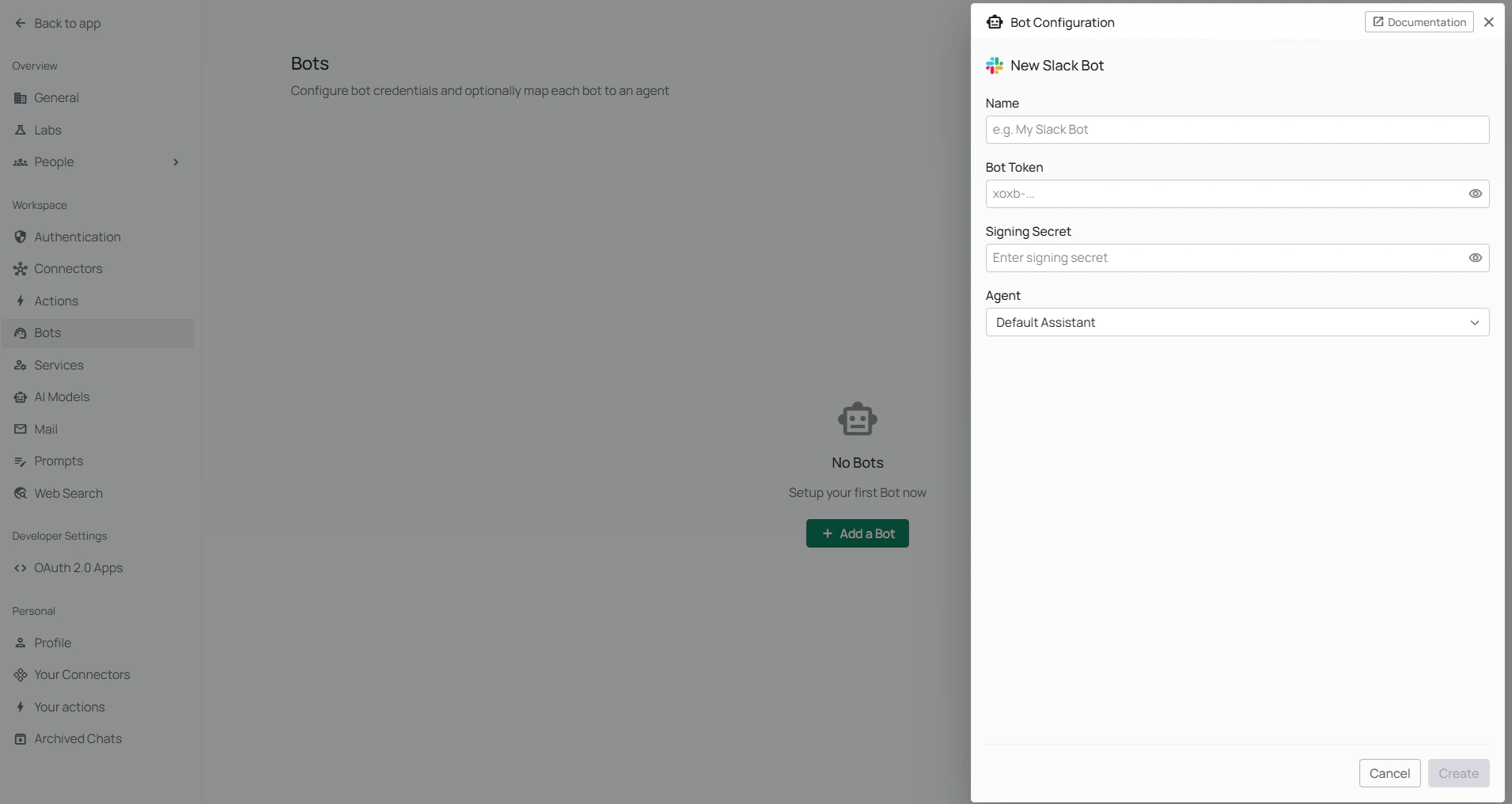
Add Bot Configuration
Click Add Bot then select Slack Bot and fill:- Slack Bot Name: Friendly display name in Pipeshub.
- Bot Token: Paste Slack Bot User OAuth Token.
- Signing Secret: Paste Slack app signing secret.
- Agent (Optional): Select a specific agent, or leave empty to use default/global chatbot handling.
Validation And Management Behavior
- Name, Bot Token, and Signing Secret are required.
- Existing configurations can be managed via Manage.
- Configurations can be removed via Delete.
- Each config can be linked to an optional agent for routing behavior.
Canonical OAuth Bot Scopes
The following scopes are used exactly as provided in your manifest:Canonical Subscribed Bot Events
The following events are subscribed exactly as provided in your manifest:File Attachments
Users can attach files to a direct message or an@bot mention, and the bot passes them to the chat along with the question.
- Each file can be up to 5 MB.
- Plain-text and Markdown files must be saved as UTF-8. The bot skips one whose content is not readable text, such as a binary file renamed to
.txt, and asks the user to save it as UTF-8 and send it again. - Save CSV and TSV files as UTF-8 where you can (in Excel, choose CSV UTF-8 (Comma delimited)). The bot also accepts a CSV saved in Excel’s older Windows format (Windows-1252), and keeps its accented letters, euro signs (€), curly quotes and long dashes (fixed in pipeshub-ai#3714). The bot skips a CSV or TSV only when its downloaded bytes contain a NUL byte (a zero byte, which usually means a binary file renamed to
.csv). - The bot skips any other type, such as Word, Excel or JSON files, and any file over the size limit. It replies in the thread with the files it skipped and the list of accepted types, whether or not the bot is linked to an agent. If some attachments were accepted, it answers using those. If the message also has a question, it still answers the question. If the message had only attachments and none were accepted, that reply is the whole answer.
End-To-End Verification Checklist
After setup, verify all layers:- Slack app created successfully from manifest.
- Event Subscriptions Request URL verified in Slack.
- App installed to workspace after any scope/event changes.
- Bot token + signing secret saved in Pipeshub Slack Bot settings.
- Send test interactions:
- Mention bot in a channel (
@YourBot hello) - Send a direct message to the bot
- Mention bot in a channel (
Troubleshooting
Request URL verification fails
- Confirm URL is exactly
{node_backend_url}/slack/events. - Confirm backend is reachable from the public internet.
- Confirm TLS/HTTPS certificate is valid.
- Confirm Node backend is running and Slack bot service is reachable internally.
401 errors from Slack event delivery
- Confirm Signing Secret in Pipeshub matches Slack app Signing Secret.
- Confirm system clock skew is not larger than 5 minutes.
Bot does not respond in Pipeshub flow
- Confirm app was reinstalled after manifest scope changes.
- Confirm Bot Token entered is a valid
xoxb-token. - Confirm the expected bot events are enabled in Event Subscriptions.
- Confirm bot configuration exists in Pipeshub and is not deleted.
Pipeshub save form errors
- Ensure all required fields are non-empty:
- Slack Bot Name
- Bot Token
- Signing Secret
Security Notes
- Treat Bot Token and Signing Secret as secrets.
- Rotate credentials immediately if exposed.
- Use production HTTPS backend URL in production.