
Whisper (Local) Speech to Text Configuration
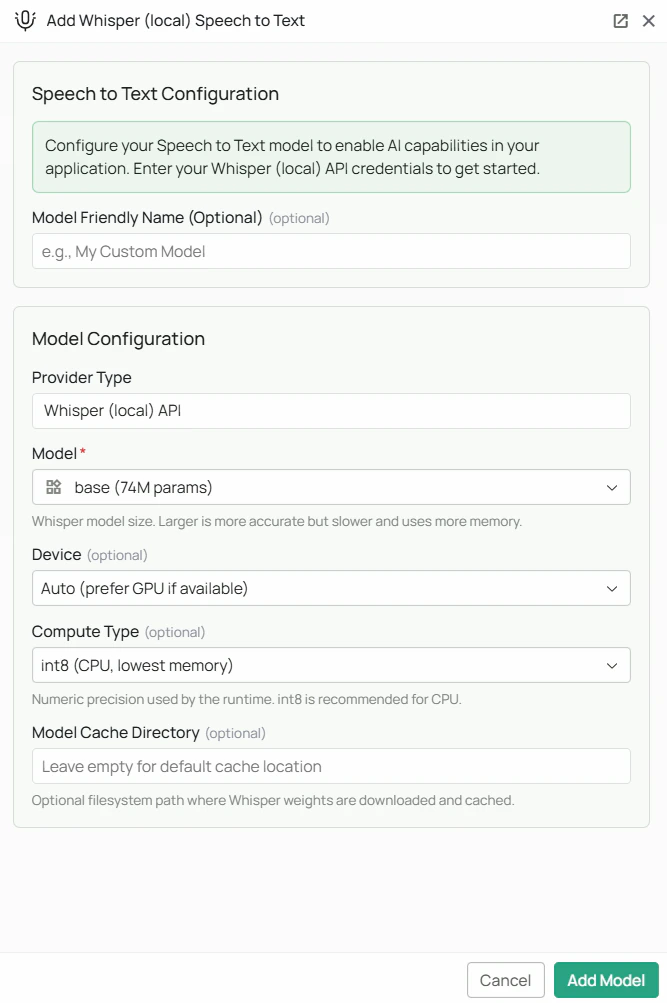
Whisper model weights are downloaded from HuggingFace on first use. Ensure the PipesHub backend host has internet access during initial setup. The
faster-whisper Python package must also be installed on the backend host.Required Fields
Model *
Select the Whisper model size from the dropdown. Larger models are more accurate but require more memory and processing time.
How to choose a model size:
- For real-time voice input where speed matters most, start with
baseorsmall - For high-accuracy transcription of important audio, use
distil-large-v3orlarge-v3 - If you have a GPU available, larger models become much more practical
Optional Fields
Device
Controls which hardware the model runs on.- Auto (default) — PipesHub automatically uses a GPU if one is available, otherwise falls back to CPU
- CPU — forces CPU inference (slower but works on any machine)
- CUDA — forces NVIDIA GPU inference (requires a compatible NVIDIA GPU with CUDA support)
Compute Type
Controls the numerical precision used during inference. Lower precision uses less memory and runs faster; higher precision is more accurate.Model Cache Directory
A filesystem path on the backend host where downloaded model weights will be stored. Leave blank to use the faster-whisper default cache location. Example:/data/whisper-models
This is useful if you want to pre-download models to a specific disk, or if the default cache location has limited storage.
Configuration Steps
As shown in the image above:- Click Configure on the Whisper (Local) provider card in the STT tab
- Select your desired Model size from the dropdown (marked with *)
- (Optional) Set Device — leave on Auto unless you need to force CPU or GPU
- (Optional) Set Compute Type — leave on
int8for CPU orint8_float16for GPU - (Optional) Set a Model Cache Directory to control where weights are stored
- (Optional) Set a Model Friendly Name
- Click Add Model to save your configuration
On first use after saving, PipesHub will download the selected model weights from HuggingFace. This may take several minutes depending on model size and network speed.
Usage Considerations
- No API costs — all transcription runs locally on your infrastructure
- The
large-v3model requires approximately 3 GB of disk space and at least 4 GB of VRAM (or 8 GB of RAM for CPU inference) distil-large-v3offers the best accuracy-to-speed ratio and is recommended for most production deployments- First use requires an internet connection to download the model weights; subsequent uses work offline
- Whisper supports transcription in 50+ languages automatically
Troubleshooting
- If the health check fails, confirm the
faster-whisperPython package is installed on the backend host - If model weights fail to download, check that the backend host has internet access and can reach HuggingFace (huggingface.co)
- If transcription is very slow, consider switching to a smaller model or enabling GPU inference with CUDA
- If you get out-of-memory errors, switch to a smaller model or use
int8compute type - Ensure the Model Cache Directory (if set) exists and is writable by the PipesHub process