
DeepSeek Configuration
What is DeepSeek?
DeepSeek is an AI research company that develops advanced language models with enhanced reasoning capabilities. Their models are designed for:- Complex problem-solving and analytical tasks
- Advanced reasoning and logical thinking
- Mathematical and scientific computations
- Code generation and analysis
- Multi-step reasoning workflows
Prerequisites
Before configuring DeepSeek in PipesHub, ensure you have:- A DeepSeek account at https://platform.deepseek.com
- An active API key from the DeepSeek platform
- Sufficient API credits or an active subscription
Required Fields
Endpoint URL *
The Endpoint URL for DeepSeek’s API service. DeepSeek API Endpoint:- The endpoint URL must include the
/v1/suffix - DeepSeek uses HTTPS for secure communication
- The endpoint is globally accessible
API Key *
The API Key is required to authenticate your requests to DeepSeek’s services. How to obtain a DeepSeek API Key:- Visit https://platform.deepseek.com
- Sign up or log in to your account
- Navigate to the API Keys section
- Create a new API key
- Copy the key immediately (it’s only shown once)
Model Name *
The Model Name specifies which DeepSeek model you want to use. Available DeepSeek Models:deepseek-chat- General-purpose conversational modeldeepseek-reasoner- Enhanced reasoning capabilities for complex tasks
Optional Features
Multimodal
DeepSeek’s current models primarily focus on text-based tasks. When to enable:- Only if using a DeepSeek model that explicitly supports vision/image understanding
- Check the DeepSeek documentation to confirm multimodal support for your chosen model
Reasoning
Enable this checkbox when using DeepSeek’s reasoning-focused models. When to enable:- You’re using
deepseek-reasoneror similar reasoning-focused models - Your use case involves complex problem-solving
- You need advanced mathematical, logical, or analytical capabilities
- Your tasks require multi-step reasoning processes
Configuration Steps
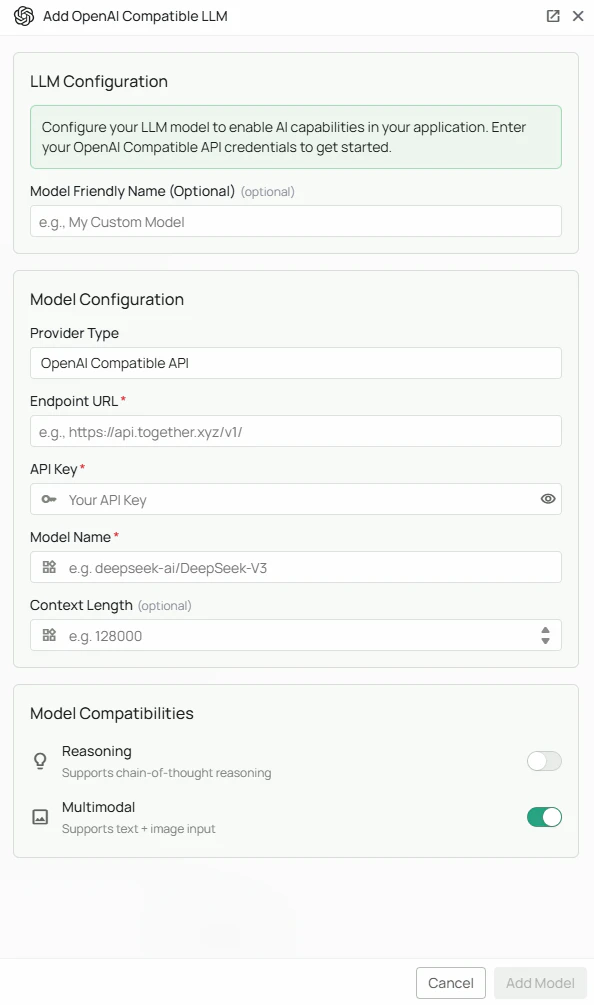
As shown in the image above:- Select “OpenAI API Compatible” as your Provider Type from the dropdown
- Enter the DeepSeek Endpoint URL:
https://api.deepseek.com/v1/ - Enter your DeepSeek API Key
- Specify the Model Name (e.g.,
deepseek-chatordeepseek-reasoner) - (Optional) Check “Multimodal” if your model supports image input
- (Optional) Check “Reasoning” if using a reasoning-focused model
- Click “Add Model” to complete the setup
Supported Models
DeepSeek offers several model variants optimized for different use cases:- deepseek-chat - General-purpose conversational AI with strong performance across various tasks
- deepseek-reasoner - Specialized model with enhanced reasoning capabilities for complex problem-solving
Usage Considerations
- API usage counts against your DeepSeek account quota and billing
- Different models have different pricing structures
- Check your account balance and rate limits regularly
- Reasoning models may have higher latency due to their enhanced thinking process
- Context window sizes vary by model - verify limits for your use case
Troubleshooting
Connection Issues:- Verify the endpoint URL is correct:
https://api.deepseek.com/v1/ - Ensure you have internet connectivity
- Check if DeepSeek’s services are operational
- Verify your API key is correct and has not expired
- Ensure your API key has been properly copied without extra spaces
- Check that your DeepSeek account has sufficient credits
- Confirm your account is in good standing
- Verify the model name is spelled correctly (e.g.,
deepseek-chat) - Check that the model is available in your region
- Ensure your account has access to the specified model
- Refer to the latest DeepSeek documentation for current model names
- Check your account’s rate limits in the DeepSeek dashboard
- Consider upgrading your plan if you frequently hit rate limits
- Implement appropriate retry logic in your application
- Ensure the selected model is currently available
- Verify that multimodal/reasoning flags match the model’s capabilities
- Check the DeepSeek status page for any ongoing issues
- Visit the DeepSeek documentation
- Contact DeepSeek support through their platform
- Reach out to PipesHub support for integration-specific questions