
x.ai Grok Configuration
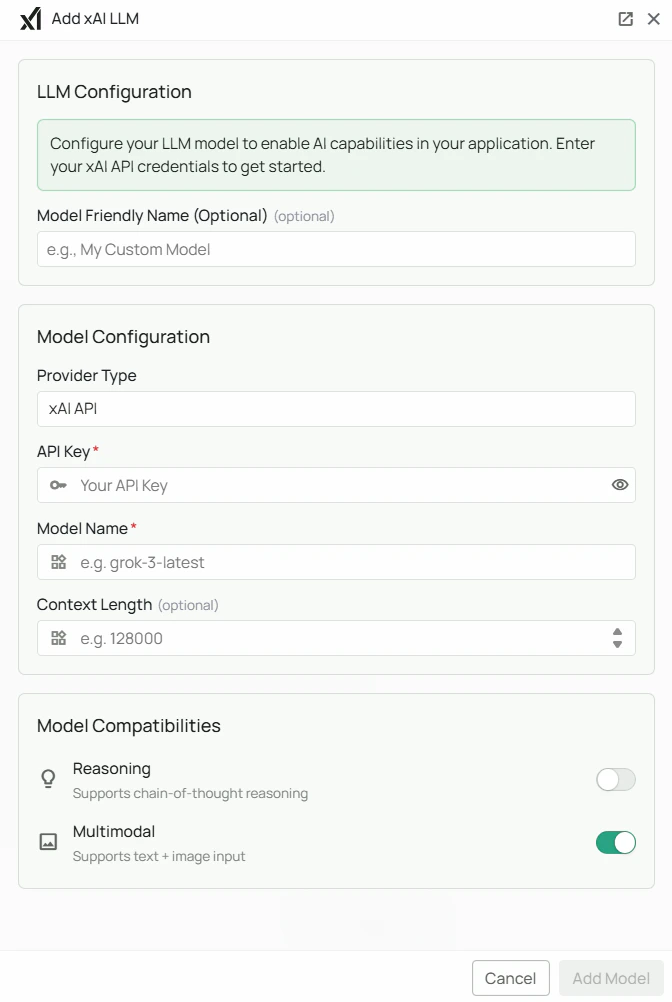
Required Fields
API Key *
The API Key is required to authenticate your requests to x.ai services. How to obtain an API Key:- Log in to the x.ai Console
- Navigate to the API Keys section
- Click on “Create new key” or use an existing key
- Copy the generated API key
Model Name *
The Model Name field defines which x.ai Grok model you want to use with PipesHub. Available x.ai Grok models:grok-3-latest- Grok 3: x.ai’s flagship multimodal model optimized for high-performance agentic tool callinggrok-3-mini-latest- Grok 3 Mini: A lighter, faster option for cost-effective use cases
- For tasks requiring complex reasoning and maximum capability, select
grok-3-latest - For faster, more cost-effective responses, select
grok-3-mini-latest - Check x.ai’s model documentation for the most up-to-date options
Optional Fields
Context Length
Specify the maximum context window for your model. x.ai Grok models typically support large context windows for handling extensive conversations and documents. Context length examples:- Grok 4.1 Fast models: Check x.ai documentation for specific context window limits
Multimodal Support
x.ai Grok models support multimodal capabilities, enabling both text and image processing. Enable this option if you want to use image understanding features in your application.Reasoning
Enable this option if your selected model supports advanced reasoning capabilities. This allows for deeper chain-of-thought analysis and complex problem-solving.Configuration Steps
As shown in the image above:- Click Configure on the xAI provider card
- Enter your x.ai API Key in the designated field (marked with *)
- Specify your desired Model Name (marked with *)
- (Optional) Configure the Context Length for your use case
- (Optional) Enable Multimodal support if needed
- (Optional) Enable Reasoning if your model supports it
- Click Add Model to save and validate your credentials
Both the API Key and Model Name are required fields to successfully configure x.ai Grok integration.
Usage Considerations
- API usage will count against your x.ai API quota and billing
- Different models have different pricing - check x.ai’s pricing page for details
- Model capabilities vary - reasoning models provide deeper analysis but may have higher latency
- x.ai Grok provides:
- High-performance agentic tool calling capabilities
- Advanced reasoning for complex problem-solving (reasoning variant)
- Multimodal understanding (text and images)
- Optimized for fast responses and efficient workflows
- Frontier-class model performance
Troubleshooting
- If you encounter authentication errors, verify your API key is correct and has not expired
- Ensure your x.ai account has billing set up if you’re using paid service tiers
- Check that the model name is spelled correctly and available
- Verify that your API key has access to the specific model you’ve selected
- If you’re experiencing rate limits, check your API usage in the x.ai Console dashboard
- For multimodal features, ensure your model supports image inputs
- If using reasoning features, verify that your selected model supports reasoning mode