
Azure AI Embeddings Configuration
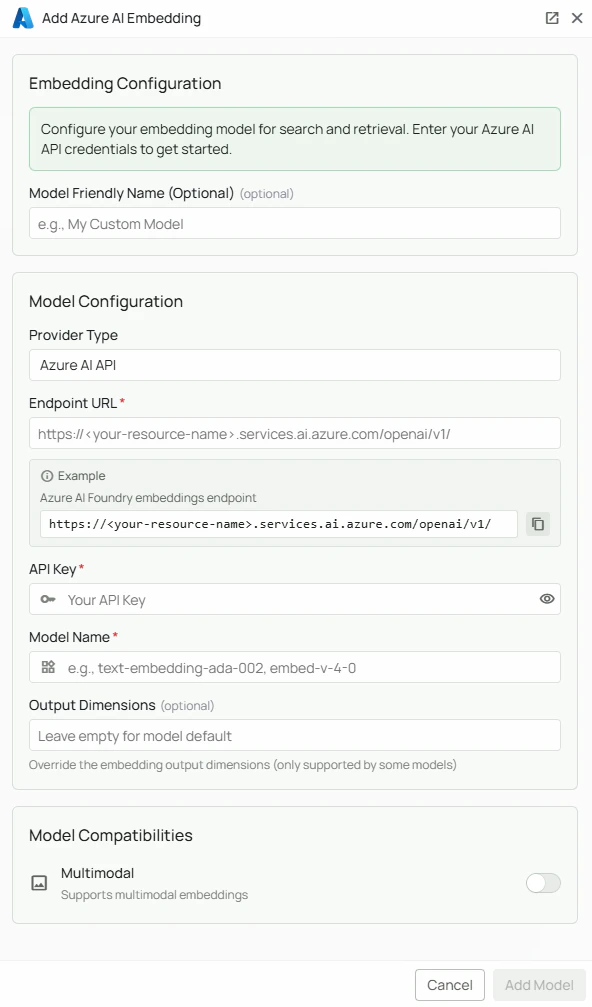
Required Fields
Endpoint URL *
The Endpoint URL connects PipesHub to your Azure AI Foundry resource. Endpoint format:- Log in to the Azure Portal
- Navigate to your Azure AI Foundry resource
- Go to the model deployments section
- Select your deployed embedding model and copy the endpoint URL
API Key *
The API Key authenticates your requests to your Azure AI service. How to obtain an API Key:- In the Azure Portal, navigate to your Azure AI resource
- Go to “Keys and Endpoint” under Resource Management
- Copy either Key 1 or Key 2 (both will work)
Model Name *
The Model Name field specifies which embedding model you want to use. Available Azure AI embedding models:text-embedding-ada-002- OpenAI’s Ada embedding model, widely used and reliableembed-v-4-0- A high-performance embedding model for retrieval tasks
- For broad compatibility and reliability, select
text-embedding-ada-002 - For higher retrieval performance, select
embed-v-4-0 - Browse the Azure AI Foundry model catalog for the full list
Configuration Steps
As shown in the image above:- Click Configure on the Azure AI provider card
- Enter your Endpoint URL in the designated field (marked with *)
- Enter your Azure AI API Key (marked with *)
- Specify your Model Name (marked with *)
- Click Add Model to save and validate your credentials
Endpoint URL, API Key, and Model Name are all required fields to successfully configure Azure AI embedding integration.
Usage Considerations
- API usage will count against your Azure AI resource’s quota and billing
- Different models have different pricing — check the Azure AI pricing page for details
- Azure AI Foundry provides access to embedding models from multiple providers with unified billing and enterprise compliance
Troubleshooting
- If you encounter authentication errors, verify your API key and endpoint URL are correct
- Ensure the endpoint URL uses the correct format:
https://<resource>.services.ai.azure.com/openai/v1/ - Verify your Azure subscription is active and has sufficient quota for the selected model
- Check that the model name matches the exact name from your Azure AI deployment