
HuggingFace Embeddings Configuration
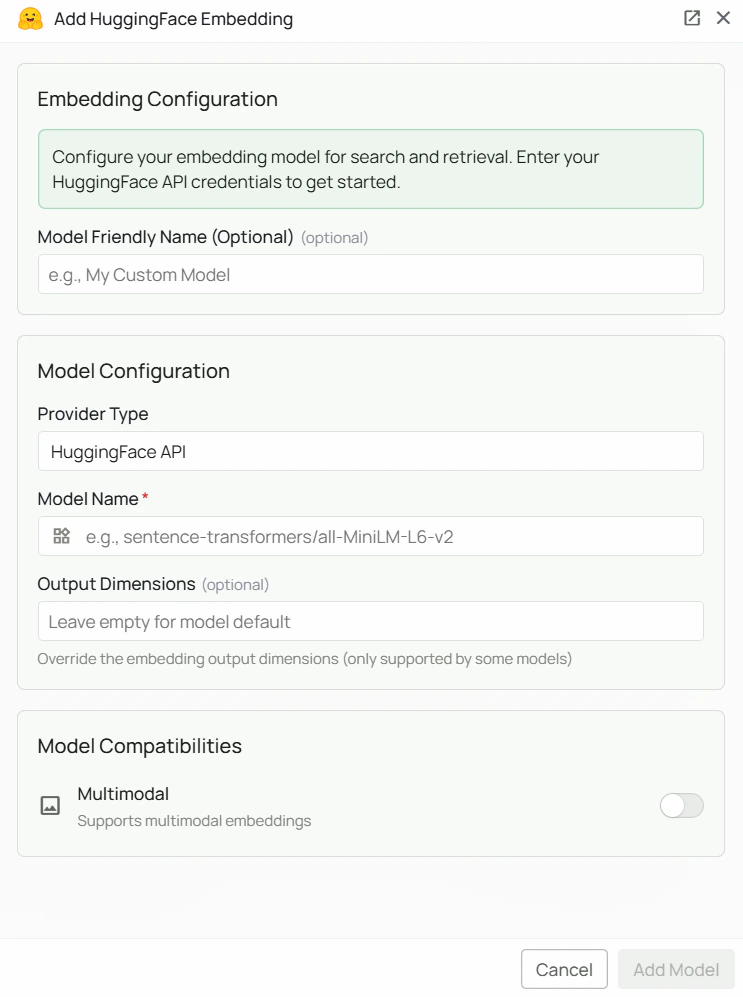
Required Fields
Model Name *
The Model Name field is the only required field. Enter the full HuggingFace model repository slug in the formatowner/model-name.
Popular HuggingFace embedding models include:
sentence-transformers/all-MiniLM-L6-v2- Lightweight, fast general-purpose model (384 dimensions)
- For general-purpose retrieval with low resource usage, select
sentence-transformers/all-MiniLM-L6-v2 - Browse the HuggingFace model hub for the full list of embedding models
- Use the exact repository slug shown on the model’s HuggingFace page
Configuration Steps
As shown in the image above:- Click Configure on the HuggingFace provider card
- Enter the full HuggingFace model repository slug in the Model Name field (marked with *) — e.g.
sentence-transformers/all-MiniLM-L6-v2 - Click Add Model to save and validate
Model Name is the only required field. No API key or external service is needed — the model runs locally inside PipesHub.
Usage Considerations
- All embedding happens locally inside PipesHub — data never leaves your infrastructure
- No API key or billing setup required
- The model is downloaded from HuggingFace on first use; ensure your PipesHub instance has outbound internet access on first load
- Larger models provide better quality but require more memory and take longer to load
Troubleshooting
- If the model fails to load, verify the repository slug is correct (e.g.
sentence-transformers/all-MiniLM-L6-v2, not justall-MiniLM-L6-v2) - Ensure your PipesHub instance can reach
huggingface.coto download the model on first use - For memory issues, switch to a smaller model
- Check that the model supports the sentence embedding task (pipeline tag:
sentence-similarityorfeature-extraction)