
OpenAI Compatible Embeddings Configuration
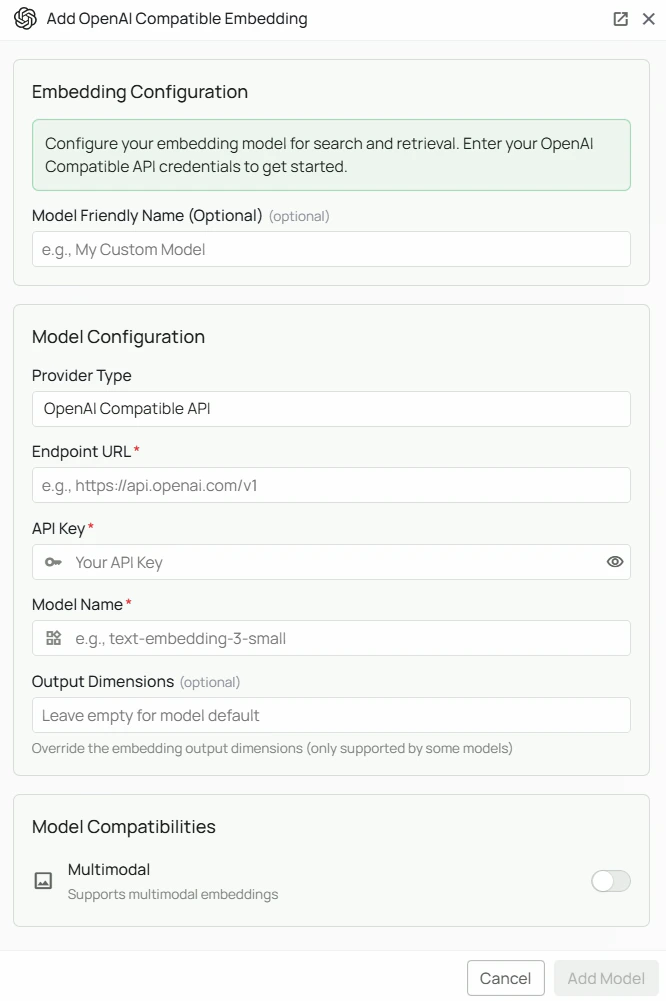
Required Fields
Endpoint URL *
The base API endpoint for your OpenAI-compatible embedding service. Format: The URL should point to the base API (typically ending in/v1/).
Example endpoints:
- OpenAI API:
https://api.openai.com/v1 - Custom proxy:
https://your-proxy.example.com/v1/
API Key *
The API Key is required to authenticate your requests to the embedding service. How to obtain an API Key:- Sign up or log in to your chosen provider’s platform
- Navigate to the API Keys or Settings section
- Create a new API key
- Copy the key immediately (most providers only show it once)
Model Name *
The Model Name field specifies which embedding model to use from your provider. Example model names:text-embedding-3-small— when using a proxy that forwards to OpenAI
- Use the exact model identifier as listed by your provider
- Check your provider’s documentation for valid model IDs
Configuration Steps
As shown in the image above:- Click Configure on the OpenAI Compatible provider card
- Enter the Endpoint URL for your embedding service (marked with *)
- Enter your API Key (marked with *)
- Specify the Model Name as listed by your provider (marked with *)
- Click Add Model to save and validate your credentials
Endpoint URL, API Key, and Model Name are all required fields. Use this provider for any service that speaks the OpenAI embeddings API format.
Usage Considerations
- API usage will count against your provider’s quota and billing
- Ensure the endpoint supports the OpenAI embeddings API format (
POST /v1/embeddings) - Response times vary by provider and model size
Troubleshooting
- Verify the endpoint URL is correct and includes the proper base path (usually
/v1/) - Ensure your API key is correct and has the necessary permissions
- Confirm the model name exactly matches your provider’s naming convention
- Check that your provider’s endpoint responds to OpenAI-format embedding requests