
Jina AI Embeddings Configuration
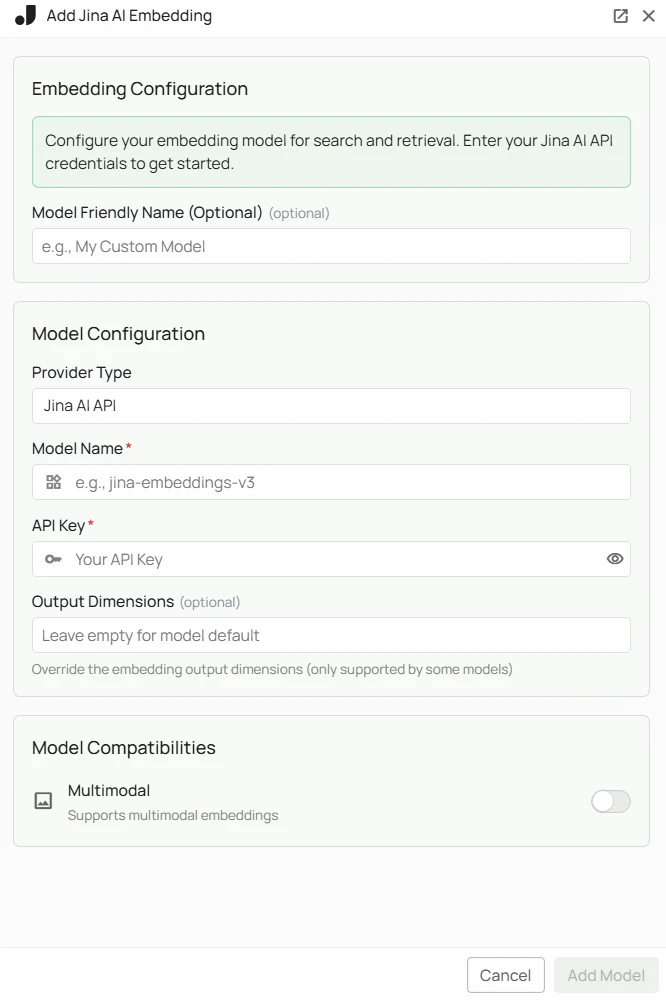
Required Fields
API Key *
The API Key is required to authenticate your requests to Jina AI’s services. How to obtain an API Key:- Log in to the Jina AI Platform
- Navigate to your account settings or API section
- Create a new API key
- Copy the generated API key
Model Name *
The Model Name field defines which Jina AI embedding model you want to use with PipesHub. Available Jina AI embedding models:jina-embeddings-v3- Jina AI’s latest embedding model with strong multilingual and long-document support
- For most retrieval and multilingual use cases, select
jina-embeddings-v3 - Check Jina AI’s model documentation for the most up-to-date options
Configuration Steps
As shown in the image above:- Click Configure on the Jina AI provider card
- Enter your Jina AI API Key in the designated field (marked with *)
- Specify your desired Model Name (marked with *)
- Click Add Model to save and validate your credentials
Both the API Key and Model Name are required fields to successfully configure Jina AI embedding integration.
Usage Considerations
- API usage will count against your Jina AI account’s quota and billing
- Different models have different pricing — check Jina AI’s pricing page for details
- Jina AI models support long-context documents and multilingual content
Troubleshooting
- If you encounter authentication errors, verify your API key is correct and has not expired
- Ensure your Jina AI account has billing set up if you are on a paid tier
- Check that the model name is spelled correctly and matches Jina AI’s naming conventions