
Ollama Embeddings Configuration
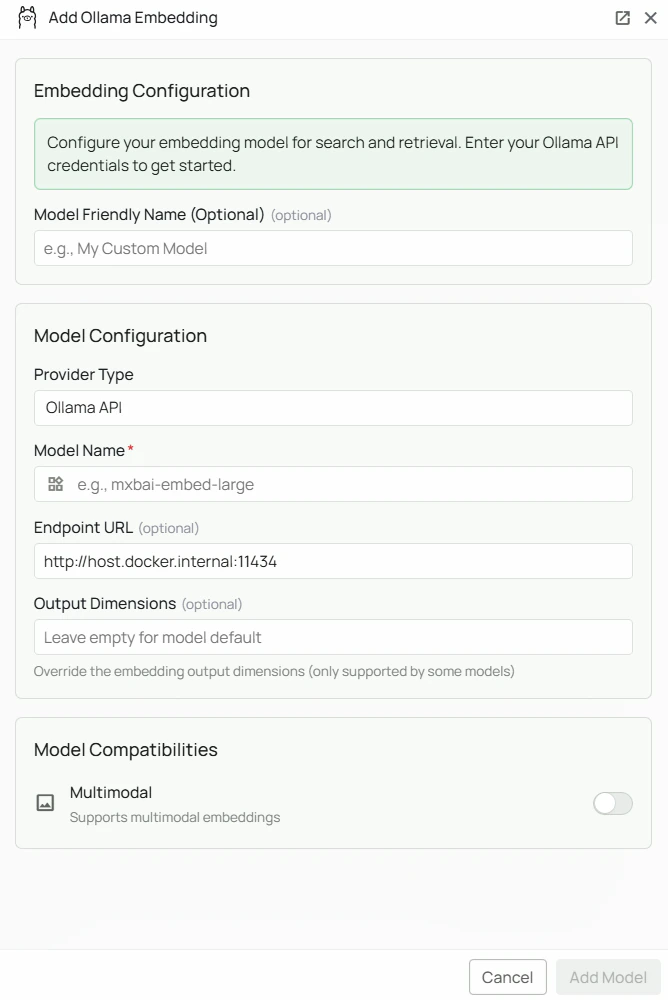
Required Fields
Model Name *
The Model Name field defines which Ollama embedding model you want to use with PipesHub. Popular Ollama embedding models include:mxbai-embed-large- A high-performance embedding model well-suited for retrieval tasks
- For general-purpose retrieval, select
mxbai-embed-large - Check Ollama’s model library for the full list of available embedding models
- Pull the model first with
ollama pull <model-name>before configuring it in PipesHub
Optional Fields
Endpoint URL
The URL where your Ollama instance is running. Defaults tohttp://host.docker.internal:11434 if left blank.
Common configurations:
http://host.docker.internal:11434— for accessing Ollama from within a Docker container (default)https://your-server-domain— for remote Ollama instances
API Key
Optional. Leave blank for standard local Ollama instances, which do not require authentication. When to use:- If you have configured authentication on your Ollama instance
- When connecting to a secured remote Ollama server
Configuration Steps
As shown in the image above:- Click Configure on the Ollama provider card
- Enter your Model Name (marked with *) — e.g.
mxbai-embed-large - (Optional) Specify your Endpoint URL — defaults to
http://host.docker.internal:11434 - (Optional) Enter an API Key if your Ollama instance requires authentication
- Click Add Model to save and validate your credentials
Model Name is the only required field. No API key is needed for a standard local Ollama installation. The endpoint defaults to http://host.docker.internal:11434 if left blank.
Prerequisites
Before configuring Ollama in PipesHub, ensure you have:- Ollama installed on your machine or server — download from ollama.com
- The embedding model pulled:
- Ollama running:
ollama serve - Network accessible: PipesHub must be able to reach your Ollama endpoint
Usage Considerations
- All embedding happens locally — data never leaves your infrastructure
- No API key or usage costs required
- Processing speed depends on your server’s available CPU/memory/GPU
Troubleshooting
- Verify Ollama is running:
ollama list - Check the endpoint URL matches where Ollama is accessible
- Ensure port 11434 is not blocked by a firewall
- For Docker deployments, verify that
host.docker.internalresolves correctly - If the model is not found, pull it first:
ollama pull <model-name>