
Together AI Configuration
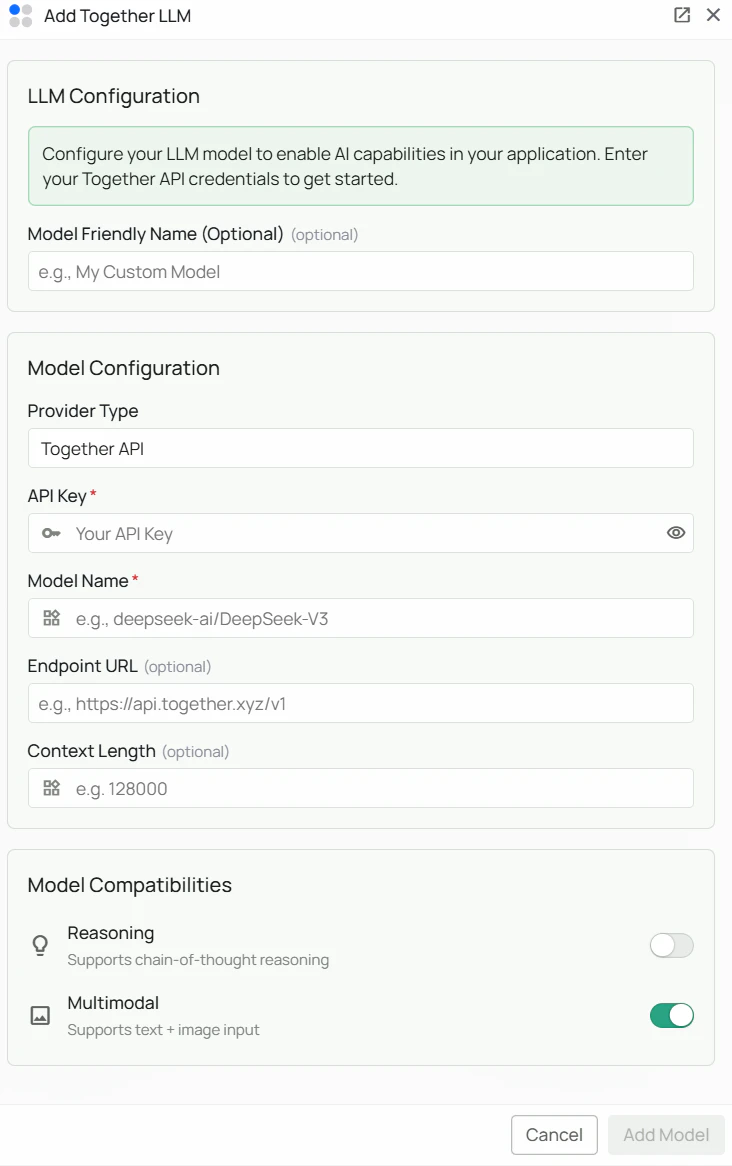
Required Fields
API Key *
The API Key is required to authenticate your requests to Together AI’s services. How to obtain an API Key:- Log in to the Together AI Platform
- Navigate to the “API Keys” section in your account settings
- Click “Create API Key”
- Copy the generated API key
Model Name *
The Model Name field defines which model you want to use through Together AI. Popular Together AI models include:deepseek-ai/DeepSeek-V3- DeepSeek’s powerful general-purpose model for complex tasks
- For powerful general-purpose tasks, select
deepseek-ai/DeepSeek-V3 - Browse Together AI’s model catalog for the full list of available models
- Use the exact model identifier shown in the catalog (format:
provider/model-name)
Optional Fields
Endpoint URL
The base API endpoint for Together AI. Leave blank to use the default Together AI API endpoint. Default:https://api.together.xyz/v1/
When to set this:
- If you are routing traffic through a custom proxy or gateway
- For enterprise deployments with a dedicated Together AI endpoint
Configuration Steps
As shown in the image above:- Click Configure on the Together AI provider card
- Enter your Together AI API Key in the designated field (marked with *)
- Specify your desired Model Name (marked with *)
- (Optional) Enter a custom Endpoint URL if required — leave blank to use the default
- Click Add Model to save and validate your credentials
API Key and Model Name are required fields. Endpoint URL is optional and defaults to the Together AI API if left blank.
Usage Considerations
- API usage will count against your Together AI account’s quota and billing
- Different models have different pricing — check Together AI pricing for details
- Together AI provides:
- Access to a large catalog of popular open-source models
- Fast, scalable cloud inference
- Competitive pricing, especially for open-source model families
Troubleshooting
- If you encounter authentication errors, verify your API key is correct and has not expired
- Ensure your Together AI account has billing or credits set up
- Check that the model name uses the exact format shown in Together AI’s model catalog (
provider/model-name) - Verify the model is available in your region and account tier
- If you are experiencing rate limits, check your usage in the Together AI dashboard